 Fintel Analytics
Supplier Prepayment Tracking for E-Commerce Without Spreadsheets
How an e-commerce team replaced a guessed supplier balance with a live one. What the tool checks, where a human signs off, and what it costs to run.
Supplier prepayment tracking works when every order automatically draws the cost of goods down from the cash you have already paid your supplier, so you see a live remaining balance instead of a number someone last typed into a sheet. In practice that means pulling orders from your storefront, applying each product's unit cost, and recording every top-up as a dated entry that cannot be quietly overwritten. The result is that you know how much supplier credit is left before you place the next order, not after the supplier tells you.
If you pay a supplier upfront, you are lending them money and trusting yourself to remember how much is left. Most e-commerce founders we speak to are doing exactly that with a spreadsheet, a bank app and a supplier inbox, and nobody can say with confidence what the balance is today. This post covers how we replaced that guesswork for an e-commerce brand, what the system checks, where a person still approves, and how to decide whether a small custom tool is worth it for you.
Why Does Supplier Prepayment Tracking Break in Spreadsheets?
It breaks because a prepayment balance is a running total fed by two messy sources: payments you make, and orders that consume stock. Both change daily, and a spreadsheet only knows what a human last entered.
A pattern we see repeatedly in early-stage e-commerce is operations spread across a storefront, a spreadsheet, a supplier inbox and a bank app, with nobody able to say what one order actually made after costs. The prepayment balance is the first thing to go stale in that setup. Orders arrive in the storefront, costs live in a column someone maintains by hand, and the payments sit in a bank feed. Reconciling the three is a weekly chore that quietly becomes a monthly chore, then a quarterly surprise.
The failure modes are consistent:
- A unit cost changes with a new supplier price list, but old orders get recalculated at the new cost and the history shifts.
- A cancelled or refunded order is never credited back, so the balance drifts downward.
- A payment is entered twice, or in the wrong currency format, and the balance is wrong by a round number nobody questions.
- Someone edits a formula to fix a one-off problem and breaks every row below it.
This is not a niche problem. A 2026 survey of 1,003 US operations professionals by DOSS found that 53% deal with spreadsheet errors every week and 22% face them daily, with manual data entry mistakes (59%) and formula errors (46%) the most common. The same research estimated that workers spend on average 3.6 hours a week just fixing spreadsheet errors. For a ten-person brand, that is a meaningful slice of someone's week spent keeping a number roughly right.
The business consequence is specific. If you do not know your remaining supplier credit, you cannot plan reorders, you cannot tell whether a product line is genuinely profitable, and you cannot answer a simple question from an investor or accountant without an afternoon of digging. If you are weighing how much of this is a data-quality issue rather than a tooling issue, our guide to stopping bad numbers at the point of entry covers the validation side.

📺 Watch: Automate Your Prepaid Expenses in Excel | No More Manual Entries

How Does a Live Supplier Prepayment Balance Actually Work?
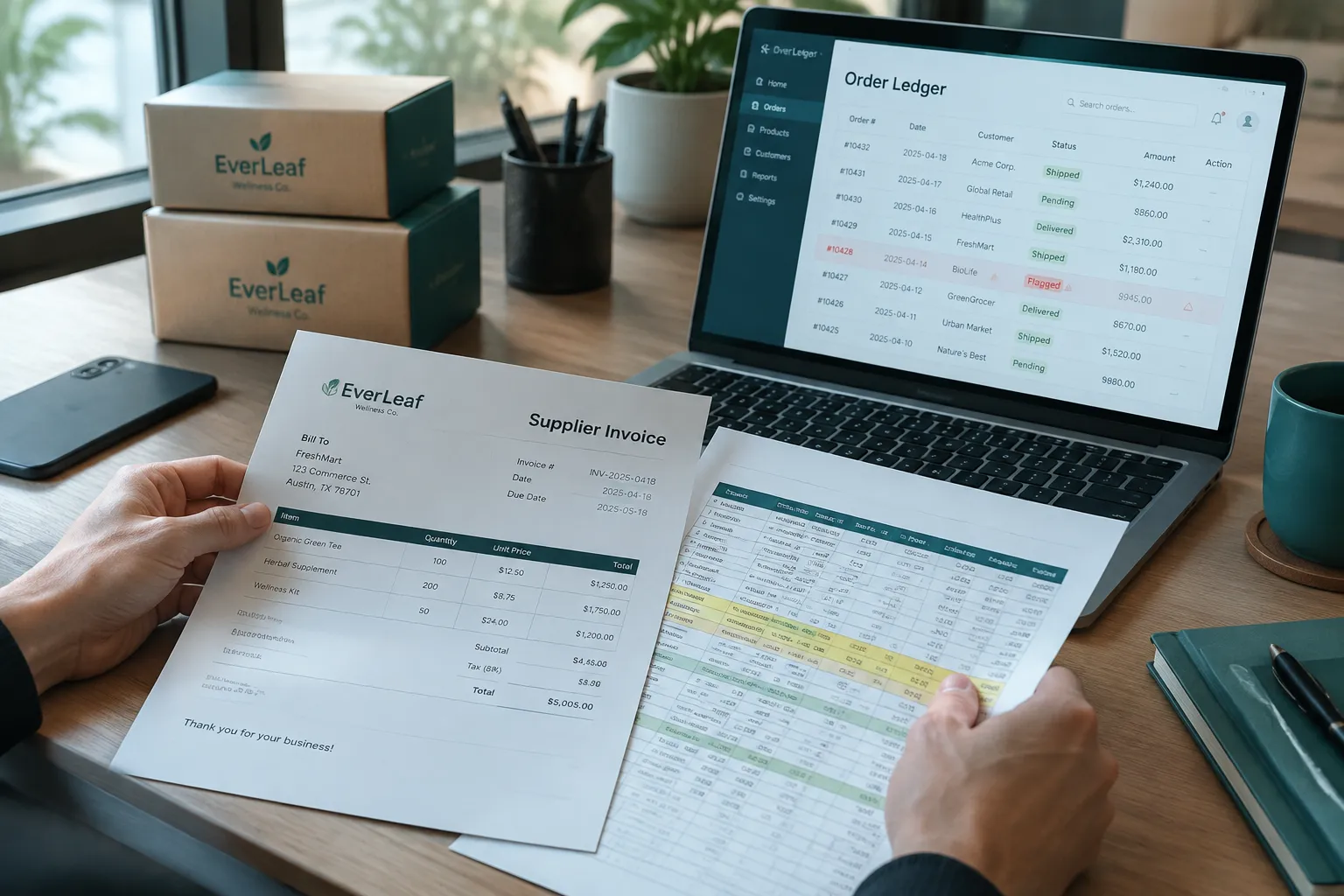
It works as a ledger with three inputs and one output. The inputs are payments to the supplier, orders from the storefront, and the unit cost of each product. The output is a remaining balance, updated every time a new order lands.
Here is how the system we built for an e-commerce brand operates, step by step.
What triggers it. New and updated orders are pulled from the storefront on a schedule. A payment to the supplier is logged as a dated entry in the tool, with an amount and a note. Nothing is typed into a balance cell, because there is no balance cell. The balance is always calculated, never stored by hand.
What it checks. For every order, the tool looks up the cost of goods for each line item and subtracts it from the supplier balance. Each order also gets a net profit and margin after cost of goods, so the same data answers a second question the founder cared about. Before anything is written, the tool checks the basics: does every product on the order have a cost, is the currency recognised, has this order already been counted, and has it been cancelled or refunded since last time. An order with a missing cost is not guessed at. It is flagged and held out of the balance until someone supplies the number.
Where a human approves. Anything the tool is unsure about goes to a person. A product with no cost, an unusually large payment, or an order that has changed after being counted all land in a short review list. The person confirms or corrects and the ledger updates. The rule is simple: the system may calculate, but it may not invent a number.
How it stays honest. Every change is recorded with when it happened and what caused it, so you can answer why the balance moved on a given day. That audit trail is what lets a finance person trust the figure rather than just admire a dashboard.
The same operations hub also keeps an expense log in sync with the spreadsheet the team already used. We did not force the team to abandon their sheet on day one. The tool reads from it, validates each row for format and obvious errors, and surfaces problems instead of silently absorbing them. Retiring the sheet became an easy decision later, once people trusted the numbers.
What Should an Internal Tool Consolidate First?
Start with the number that causes the most expensive surprises, not the one that is most annoying to maintain. For most e-commerce brands that is a short list, and the order matters.
- The supplier balance. It is cash you have already spent, and it gates your next purchase. This is the highest-value, lowest-ambiguity calculation, which makes it the right first build.
- Cost of goods per order. Once orders draw down the balance, you already hold the data to show profit per order after costs. If you are weighing which margin view to trust, our post on net profit per order explains why the blended number hides the problem.
- The expense log. Sync it, validate it, and only then decide whether the old sheet can be switched off.
- Routine drafting and questions. Only after the numbers are solid is it worth adding AI on top.
If this is a process your team still runs by hand, see how Fintel Analytics builds tools like this. We design and ship internal tools and AI agents that take over exactly this kind of work, with cost tracking, approval steps and audit trails built in.
The order matters because of what AI is and is not good for here. The prepayment balance is arithmetic, and we deliberately kept models out of anything that touches money. A language model is the wrong tool for deciding whether an order's cost is correct. It is a good tool for the jobs around the edges. In the same hub, AI pipelines draft blog and social posts that a person approves before anything is published, and routine questions go to a cheap model while only marketing analysis goes to a stronger one. That split is why the running costs stay small. If you want the reasoning behind that choice, we cover it in our guide to LLM model routing.
What Still Needs a Person, and What Went Wrong Before It Worked?
A person still owns anything involving judgement or money leaving the account. The tool tells you the balance. It does not decide how much to top up, which supplier to trust, or whether a price rise is acceptable.
Three things still need a human in this setup:
- Supplying and approving unit costs. The tool is only as good as the cost per product. When a new supplier price list arrives, someone must update it, and the change should apply from that date forward rather than rewriting history.
- Recording payments. The payment entry is still manual, which is why it is validated and logged. Connecting a bank feed is possible, but we would only add it once the manual version had proven reliable.
- Resolving exceptions. Refunds, partial shipments and disputed orders need a decision. The tool surfaces them. It does not settle them.
What went wrong on the way there is instructive, because these are the traps most first builds fall into. The early temptation is to recalculate everything from scratch each time, which silently rewrites past profit when a cost changes. The fix is to treat cost as dated and to never overwrite history. The second is trusting the order feed to be tidy: cancelled, edited and duplicate orders all appear, and a balance that ignores them drifts. The third is letting the tool guess when data is missing. A guessed cost looks fine on a dashboard and is wrong in your accounts. Flagging and holding the order is slower and far more trustworthy.
The same discipline applies to any AI added later. If you want to see how production teams handle approval and traceability, our post on the AI agent approval workflow goes deeper.
Is Supplier Prepayment Tracking Worth Building Yourself?
It is worth building when the number is wrong often enough, or matters enough, that a mistake costs more than the tool. Use these four tests.
- Does a wrong balance change a buying decision? If you reorder based on remaining credit, yes.
- Do two or more people edit the source? Shared sheets with multiple editors are where silent errors live.
- Does the answer take longer than five minutes to find? If someone has to reconcile a storefront export against a bank statement, the process is already costing you.
- Would an accountant or investor ask for it? Anything that must survive scrutiny needs a trail, not a screenshot.
If you answer yes to two or more, a small custom tool is likely to pay for itself. If you answer yes to none, keep the spreadsheet and add basic validation. Our guide to build versus buy for internal tools walks through the wider decision.
What does it cost to run? For a tool like this, the ongoing cost is small, because the heavy lifting is ordinary code and database storage rather than model calls. We do not quote a single figure, because it depends on order volume and how much AI drafting you switch on. What matters more is that the cost is visible. Every paid model call in the system is logged, so you can measure cost per useful output, such as an approved post, rather than guessing at a monthly total. That habit is what separates a tool you can defend from an AI pilot nobody can price. For a related view, see our walkthrough of AI agent cost per run.
What is the realistic benefit? We would be wary of anyone promising a specific percentage saving. What you can expect is that the number is available the moment you need it, the weekly reconciliation disappears, and a classic spreadsheet failure, the wrong cell edited at the wrong time, stops being able to hurt you. In similar work for other clients, migrating calculations out of spreadsheets into governed models eliminated a class of recurring manual errors and cut weekly maintenance time by 30 minutes. A reconciliation process that previously took 30 to 50 minutes was rebuilt as an automated pipeline that now completes in under 3 seconds. The same logic applies to a supplier balance.
Frequently Asked Questions
Q: What is a supplier prepayment balance?
A: It is the amount of money you have paid a supplier in advance that has not yet been used against delivered or ordered goods. Each order draws it down by the cost of goods. Tracking it tells you how much supplier credit remains before you need to top up.
Q: How do you track supplier prepayments in e-commerce?
A: Log every payment as a dated entry, pull orders from your storefront, apply each product's unit cost, and calculate the balance rather than typing it. Add checks for missing costs, cancelled orders and duplicates so the figure stays reliable. A spreadsheet can do this at low volume, but it needs validation and a change history.
Q: When should an e-commerce business build an internal tool instead of using a spreadsheet?
A: Build when a wrong number changes a buying decision, when several people edit the same file, or when finding the answer takes more than a few minutes. If none of these apply, a validated spreadsheet is usually enough. The decision is about the cost of an error, not the size of the company.
Q: Can AI track supplier prepayments?
A: AI is the wrong tool for the balance itself, because that is arithmetic that should be deterministic and auditable. It is useful around the edges, such as drafting content for approval or answering routine questions. We keep models out of anything that moves or records money.
Q: How much does a custom internal tool cost to run?
A: Running costs are usually small when most of the logic is ordinary code and only occasional tasks call a model. The key is to log every paid model call and route simple tasks to cheaper models. That lets you measure cost per useful output rather than cost per call.
The challenge for most growth-stage e-commerce teams is not a lack of data. It is that the number that matters, what is left of the cash already paid to a supplier, lives in a spreadsheet that one wrong edit can break. At Fintel Analytics, we have helped e-commerce, fintech and payments businesses replace exactly this kind of fragile process with production internal tools that have cost tracking, human approval steps and audit trails from day one. If a stale balance is quietly shaping your buying decisions, that is a fixable problem, and the fix usually pays for itself the first time it prevents a surprise.