 Fintel Analytics
dbt UNNEST Without Filters in BigQuery: Fix the Row Explosion
dbt models that UNNEST repeated fields without a prior filter silently multiply row counts, inflate bytes billed, and corrupt downstream aggregations. Here is how to find and fix them.
The Short Answer: What dbt UNNEST Without Filters Actually Does to Your BigQuery Bill
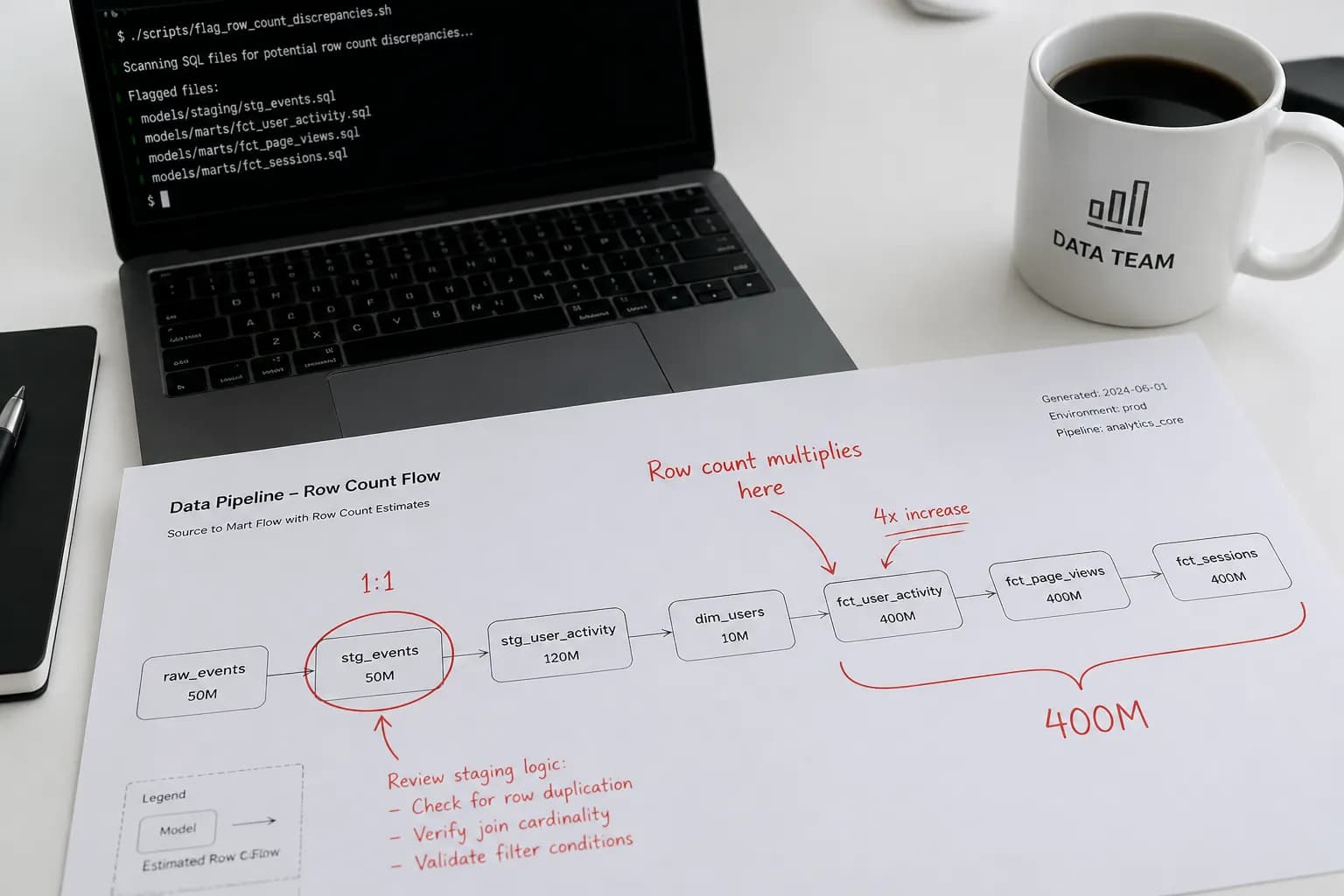
When a dbt model uses UNNEST on a repeated field in BigQuery without first filtering the parent table, it explodes every row by the cardinality of the array before applying any downstream logic. If that table has 50 million parent rows and each row carries an average of 8 array elements, your model is processing 400 million rows — whether you asked for them or not. That bloat flows silently into every downstream model and dashboard metric that touches it.
This is one of the harder cost leaks to spot because nothing breaks visibly. The model runs. The dashboard populates. The numbers look plausible. But the bytes billed are 3–10x what they should be, and aggregations on top of the unnested model are counting the same event multiple times — producing metrics that are quietly, consistently wrong.
Why This Pattern Appears So Often in dbt Projects
Most analytics engineers encounter UNNEST for the first time when working with event-stream data, API payloads, or anything loaded via a modern EL tool. GA4 data in BigQuery is the canonical example — every event row carries an event_params array that can hold dozens of key-value pairs. Payment platform webhooks frequently arrive as nested structures with repeated line items, fee breakdowns, or metadata arrays. Same pattern across Stripe, Adyen, and most open banking feeds.
The natural impulse — especially under deadline pressure — is to write the UNNEST in a staging model and be done with it:
-- stg_events.sql (the pattern that causes the problem)
SELECT
  event_date,
  event_name,
  user_pseudo_id,
  ep.key   AS param_key,
  ep.value.string_value AS param_value
FROM {{ source('ga4', 'events') }}
CROSS JOIN UNNEST(event_params) AS ep
This model reads the full source table, explodes every event_params array, and materialises the result. If events is a 500 GB table with an average of 12 params per event, you have just created a ~6 TB intermediate model. Every downstream model that references stg_events now starts from 6 TB instead of 500 GB.
BigQuery supports nested and repeated fields, which are useful for structured data — but inefficient use of UNNEST can significantly increase data processing. The cost follows directly: unnecessary unnesting increases the amount of data processed, which directly increases cost.
A pattern we see repeatedly when auditing early-stage data stacks: the staging model was written when the table was small, the cost was invisible, and no one revisited it as the table grew. By the time we are brought in, the nightly job is processing terabytes it should never have touched.

📺 Watch: SQL WITH Clause | Clearly Explained | CTEs vs Subqueries vs Temp Tables | Recursive CTEs

How to Detect dbt Models With Unfiltered UNNEST in Under Five Minutes
There are two complementary checks: one at the SQL source level, and one from BigQuery's job history. Run both.
Check 1 — Find UNNEST calls in your dbt compiled SQL with no preceding WHERE clause
This shell command scans your compiled dbt SQL directory and flags any model that contains UNNEST but does not have a WHERE clause before it is called. It is a blunt instrument but catches the obvious cases fast:
# From your dbt project root, after running dbt compile
grep -rl "UNNEST" target/compiled/ | while read f; do
  if ! grep -q "WHERE" "$f"; then
    echo "NO WHERE CLAUSE: $f"
  fi
done
Any file returned by this command is a candidate. Open it and check whether the filter (if any) happens before or after the UNNEST.
Check 2 — Find the models actually blowing up your bytes billed in BigQuery job history
This query pulls the last 30 days of jobs from INFORMATION_SCHEMA, filters for dbt-issued queries (dbt tags its queries), and ranks them by bytes processed. If an unnested staging model is the problem, it will appear near the top:
SELECT
  job_id,
  query,
  ROUND(total_bytes_processed / POW(1024, 3), 1) AS gb_processed,
  ROUND(total_bytes_billed  / POW(1024, 3), 1) AS gb_billed,
  creation_time
FROM
  `region-us`.INFORMATION_SCHEMA.JOBS
WHERE
  creation_time >= TIMESTAMP_SUB(CURRENT_TIMESTAMP(), INTERVAL 30 DAY)
  AND job_type = 'QUERY'
  AND state    = 'DONE'
  AND LOWER(query) LIKE '%unnest%'
ORDER BY
  total_bytes_billed DESC
LIMIT 30;
Replace region-us with your actual BigQuery region. Sort descending by gb_billed and look at the queries in the top ten rows. If the UNNEST call appears before any partition filter or WHERE predicate in the query text, you have found it.
Check 3 — Verify row count explosion in the materialised model
For any suspected model, compare the row count of the unnested output to the source:
-- Run these separately and compare
SELECT COUNT(*) FROM `your_project.your_dataset.stg_events`;          -- unnested model
SELECT COUNT(*) FROM `your_project.your_dataset.raw_events`;           -- source

-- If stg_events >> raw_events, you have a row explosion
-- The ratio approximates the average array cardinality per row
If the staging model has 8x the rows of the source, every SUM, COUNT, and AVG downstream is either inflated 8x or wrong in a way that depends on how the downstream model groups the data. We have seen finance dashboards showing revenue figures that were technically correct on a per-line-item basis but were being interpreted as order-level figures — a silent metric corruption that persisted for months.
A free tool that automates this across your whole project: Running those checks manually for one model is fine. Doing it across a project with 80 models is not. fintel-scan is a free, open-source, MIT-licensed CLI that runs this check and 14 others locally with no warehouse connection:
uvx fintel-scan.
How to Fix an Unfiltered UNNEST Model in dbt
The fix depends on what the model is actually for. There are two correct patterns:
Pattern 1 — Filter the parent table before you UNNEST
If you only need events from a specific date range or a subset of event types, apply that filter in a CTE before the UNNEST:
-- stg_events_fixed.sql
WITH base AS (
  SELECT
    event_date,
    event_name,
    user_pseudo_id,
    event_params
  FROM {{ source('ga4', 'events') }}
  WHERE event_date >= DATE_SUB(CURRENT_DATE(), INTERVAL 90 DAY)   -- partition filter first
    AND event_name IN ('purchase', 'add_to_cart', 'begin_checkout') -- row filter second
)
SELECT
  event_date,
  event_name,
  user_pseudo_id,
  ep.key   AS param_key,
  ep.value.string_value AS param_value
FROM base
CROSS JOIN UNNEST(event_params) AS ep
Run computationally expensive operations — including UNNEST — on the smallest dataset possible, applying filters before these operations where possible. That ordering is the entire fix. The UNNEST now operates on a pre-filtered, smaller dataset.
Pattern 2 — Extract only the specific keys you need using a subquery
If you need a single param (say, page_location) rather than all params, do not flatten the entire array. Extract just the value you need:
-- Extract a single param without exploding the array
SELECT
  event_date,
  event_name,
  user_pseudo_id,
  (
    SELECT ep.value.string_value
    FROM UNNEST(event_params) AS ep
    WHERE ep.key = 'page_location'
    LIMIT 1
  ) AS page_location
FROM {{ source('ga4', 'events') }}
WHERE event_date = CURRENT_DATE()
This correlated subquery unnests only for the rows that need it and returns exactly one value per parent row. No row explosion, no downstream aggregation corruption. When you need to filter parent records based on array contents without flattening, using a correlated subquery returns one row per parent record — not one per array element — where at least one element matches the condition.
What to do with downstream models
Once you have fixed the staging model, check every model in your lineage that references it. If downstream models were applying GROUP BY or DISTINCT to compensate for duplicates, those workarounds may now produce incorrect results in the other direction — they were silently correcting for a problem that no longer exists. Use dbt Lineage Blind Spots: Why Downstream Models Break Silently as a reference for tracing the full impact through your DAG before you deploy.
How to Stop This Recurring: Governance and Testing
Add a dbt test on row count ratio at the staging layer
A custom generic test that compares the row count of the unnested model to the source is the most direct guard:
-- tests/assert_unnest_ratio_bounded.sql
-- Fails if stg_events has more than 20x the rows of the source
-- Adjust the multiplier to match your expected array cardinality
SELECT
  COUNT(*) AS unnested_rows,
  (
    SELECT COUNT(*)
    FROM {{ source('ga4', 'events') }}
    WHERE event_date = CURRENT_DATE()
  ) AS source_rows
FROM {{ ref('stg_events') }}
WHERE event_date = CURRENT_DATE()
HAVING COUNT(*) > 20 * (
  SELECT COUNT(*)
  FROM {{ source('ga4', 'events') }}
  WHERE event_date = CURRENT_DATE()
)
If the array cardinality grows beyond expectations — because the upstream API added new event params, for instance — this test fails in CI before it reaches production. For broader test coverage patterns, see dbt Models With No Tests: Find Them in BigQuery Now.
Enforce partition filters via BigQuery's require_partition_filter table option
For very large event tables, set require_partition_filter = TRUE on the table. BigQuery will reject any query that does not include a partition column filter — which means it will also reject any UNNEST query that operates on the full table by accident:
ALTER TABLE `your_project.your_dataset.raw_events`
SET OPTIONS (require_partition_filter = TRUE);
This is a blunt but effective safeguard. It means any dbt model that forgets the partition filter fails at run time rather than silently blowing through the budget.
Add model-level documentation calling out the UNNEST contract
In your schema.yml, add a description that explicitly documents the intended filter contract for any model that uses UNNEST. Future contributors who modify the model will see it:
models:
  - name: stg_events
    description: >
      Unnests event_params from the GA4 events source.
      IMPORTANT: This model filters to event_date >= 90 days before UNNEST.
      Do not remove the date filter — doing so will 10x bytes billed and
      corrupt downstream aggregation models.
It sounds obvious. In practice, a comment like this has prevented multiple regressions during team handovers and contractor rotations on client projects.
Frequently Asked Questions
Q: How do I know if my dbt model's UNNEST is causing a row explosion rather than working correctly?
A: Compare the row count of the unnested model against its source using a simple SELECT COUNT(*) on both. If the ratio significantly exceeds your expected array cardinality (i.e. you expect 5 params per event but the model has 50x the source rows), you have an unfiltered UNNEST expanding more data than intended. Also check INFORMATION_SCHEMA.JOBS for the total_bytes_billed on that model's compile query — a sudden spike after the table grew is the other tell.
Q: Does UNNEST always inflate bytes processed in BigQuery?
A: Not inherently — UNNEST is the correct tool for repeated fields and BigQuery's columnar storage handles it efficiently when you access only the nested columns you need. The problem arises when you UNNEST before filtering, forcing BigQuery to explode the full table before any predicate can reduce the working set. Filter first, UNNEST second, and only select the specific array keys you actually need.
Q: Can I use LEFT JOIN UNNEST instead of CROSS JOIN UNNEST to avoid the problem?
A: The join type controls whether parent rows with empty arrays are retained (LEFT JOIN) or dropped (CROSS JOIN) — it does not fix the row explosion. Both patterns still expand the dataset by the array cardinality of every parent row. The fix is always the same: filter the parent table before the UNNEST, or use a correlated subquery to extract specific values without full array flattening.
Q: Why do my downstream SUM metrics come out wrong after fixing an unfiltered UNNEST model?
A: If your downstream models were inadvertently grouping or deduplicating to compensate for the inflated row counts, removing the inflation changes what those operations produce. After fixing the staging model, audit every downstream model that uses SUM, COUNT, or AVG against the unnested table and verify aggregation grain. A metric that was "correct" because two errors cancelled each other out will now expose the underlying issue.
Q: How can I prevent a future engineer from accidentally removing the filter from a dbt model that uses UNNEST?
A: Three layers: (1) document the filter contract in schema.yml with a warning; (2) add a row-count ratio test that fails in CI if the unnested output exceeds expected array cardinality; (3) enable require_partition_filter on the source table in BigQuery, which makes the filter structurally mandatory rather than advisory. The combination of documentation, automated testing, and warehouse-enforced constraints is the only pattern that reliably survives team growth and contributor turnover.
Unfiltered UNNEST in dbt is one of those problems that compounds quietly — it starts as a modest cost bump, becomes a significant line item as tables grow, and eventually produces downstream metrics that nobody can fully trust. At Fintel Analytics, we have caught this pattern in production stacks across fintech, e-commerce, and payments clients — often during a cost audit that was triggered by something else entirely. If your BigQuery bill has been climbing without an obvious explanation, or your event-level metrics look subtly off, this is one of the first places we look. The fix is straightforward once you know where to look, but finding it without a systematic audit is harder than it should be.