 Fintel Analytics
BigQuery Scheduled Query Costs: Find the Query Wrecking Your Bill
A single misconfigured scheduled query can scan hundreds of TB before anyone notices. Here is how to find it — and fix it — in under five minutes.
The Short Answer
To find which BigQuery scheduled query is driving your bill, query INFORMATION_SCHEMA.JOBS filtered on job_id LIKE 'scheduled_query_%', ordered by total_bytes_billed DESC. That single query surfaces every scheduled job, ranked by cost, in the last 30 days — and most teams find their culprit in the top three rows.
If your BigQuery bill has jumped — not gradually, but sharply, quarter over quarter — the most likely cause is not your analysts running ad-hoc SQL. It is a scheduled query that was written during an earlier, smaller phase of your data stack and has never been revisited since the underlying tables grew. A single runaway query or a misconfigured scheduled query can scan hundreds of TB before anyone notices. On-demand pricing charges $6.25 per TiB of data scanned as of early 2026 — so a query touching 10 TB twice a day is a $3,750 monthly line item before you have even opened the console.
This post shows you how to diagnose it, fix it, and make sure it does not happen again.
Why BigQuery Scheduled Queries Become a Cost Trap
Scheduled queries are set up once and then forgotten. That is the problem. When the query was written, the target table had 50 million rows. Eighteen months later it has 2 billion, and the query still has no partition filter. Nobody notices because the result looks correct — it just costs twenty times more to produce it.
The most expensive way to query data is using SELECT *. When you use SELECT *, BigQuery performs a full scan of every column in the table, leading to unnecessary I/O and materialisation costs. Scheduled queries compound this problem because they run on a timer. A poorly written query that costs $40 in a one-off session costs $1,200 a month if it runs hourly.
A pattern we see repeatedly at Fintel Analytics: a growth-stage company builds a daily reconciliation scheduled query against a raw events table. At launch, that table is 20 GB. By Series A, it is 4 TB. The query has no partition filter, no column selection, and runs every four hours. By the time anyone looks at the bill, it is a significant monthly line item — and nobody can trace it because the BigQuery console does not surface scheduled query costs in a way that makes the culprit obvious at a glance.
Cost drivers include inefficient batch loading patterns, suboptimal scheduling that creates slot contention, and streaming insert frequency that exceeds business requirements. But in practice, the single biggest lever is almost always a small number of high-frequency, unfiltered queries running against large tables.

📺 Watch: BigQuery: Configuring and scheduling queries
How to Find the Scheduled Query Wrecking Your BigQuery Bill
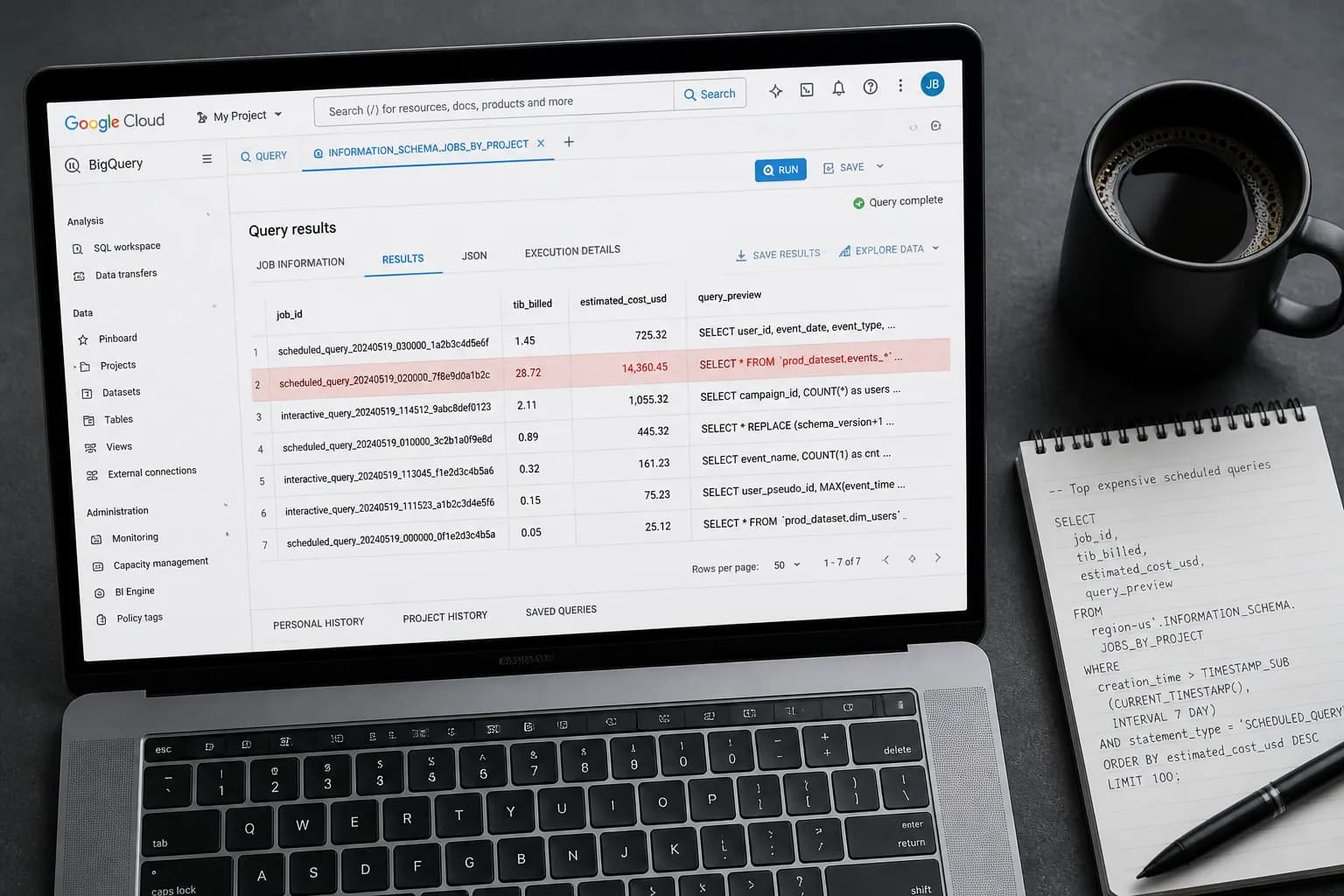
The fastest diagnostic is a direct query against INFORMATION_SCHEMA.JOBS. BigQuery prefixes scheduled query job IDs with scheduled_query_, which means you can isolate them completely from ad-hoc and dbt-driven queries.
Run this in the BigQuery console against your project's region (swap region-us for your actual region):
SELECT
  job_id,
  user_email,
  ROUND(total_bytes_billed / POW(1024, 4), 4) AS tib_billed,
  ROUND((total_bytes_billed / POW(1024, 4)) * 6.25, 2) AS estimated_cost_usd,
  TIMESTAMP_DIFF(end_time, start_time, SECOND) AS runtime_seconds,
  creation_time,
  SUBSTR(query, 1, 300) AS query_preview
FROM
  `region-us`.INFORMATION_SCHEMA.JOBS
WHERE
  creation_time >= TIMESTAMP_SUB(CURRENT_TIMESTAMP(), INTERVAL 30 DAY)
  AND job_type = 'QUERY'
  AND STARTS_WITH(job_id, 'scheduled_query_')
  AND state = 'DONE'
ORDER BY
  total_bytes_billed DESC
LIMIT 20;
This query will return your twenty most expensive scheduled jobs from the last 30 days, with an estimated USD cost per execution based on the $6.25/TiB on-demand rate as of 2026. The query_preview column gives you the first 300 characters of the SQL — enough to see whether a partition filter is present.
What you are looking for:
- Any row where
estimated_cost_usdis above $5 per run and there is no partition predicate in the query preview - Any job running more frequently than its output actually requires (a query refreshing a "daily" report hourly is a common find)
- Jobs scanning the same table repeatedly that could be replaced with a materialised view or a dbt incremental model
To see how often each scheduled query runs and what it is costing in aggregate per month, group by the query signature:
SELECT
  SUBSTR(query, 1, 200) AS query_signature,
  COUNT(*) AS executions_last_30d,
  ROUND(SUM(total_bytes_billed / POW(1024, 4)), 2) AS total_tib_billed,
  ROUND(SUM(total_bytes_billed / POW(1024, 4)) * 6.25, 2) AS total_cost_usd,
  ROUND(AVG(TIMESTAMP_DIFF(end_time, start_time, SECOND)), 0) AS avg_runtime_sec
FROM
  `region-us`.INFORMATION_SCHEMA.JOBS
WHERE
  creation_time >= TIMESTAMP_SUB(CURRENT_TIMESTAMP(), INTERVAL 30 DAY)
  AND job_type = 'QUERY'
  AND STARTS_WITH(job_id, 'scheduled_query_')
  AND state = 'DONE'
GROUP BY
  query_signature
ORDER BY
  total_cost_usd DESC
LIMIT 15;
In a real engagement, this second query is the one that surprises people most. We have seen teams discover a single scheduled query running 720 times a month (every hour, 24/7) against an unpartitioned 3 TB table — a cost they had attributed to "general growth" rather than one specific job that was trivially fixable.
Running those two queries for your project is all it takes to find the culprit. If you want to run this check — plus fourteen other cost and correctness checks — across your entire dbt project without a warehouse connection, fintel-scan is a free, open-source MIT-licensed CLI that does exactly that:
uvx fintel-scan.
How to Fix a Runaway BigQuery Scheduled Query Cost
Once you have identified the offending query, the fix almost always falls into one of three categories.
1. Add a Partition Filter
This is the single highest-leverage fix available. Partitioning every table over 1 GB by the most commonly filtered column — usually a date or timestamp — means that querying a single day on a 10 TB table scans roughly 27 GB instead of 10 TB. If the scheduled query has no WHERE clause filtering on the partition column, add one. Most scheduled queries that aggregate "recent" data only need the last day or the last week — not the full table history.
-- Before: full table scan, every run
SELECT user_id, SUM(amount) AS total
FROM `project.dataset.transactions`
GROUP BY user_id;

-- After: partition-pruned, scans 1 day of data
SELECT user_id, SUM(amount) AS total
FROM `project.dataset.transactions`
WHERE DATE(created_at) = DATE_SUB(CURRENT_DATE(), INTERVAL 1 DAY)
GROUP BY user_id;
The difference in bytes billed can be three orders of magnitude.
2. Replace SELECT * With Explicit Column Selection
Using SELECT * on a wide table is expensive. Selecting only needed columns can reduce the cost from $50 to $2 on an 8 TiB table, depending on which columns are actually required. Audit the output of the scheduled query. If it writes to a downstream table or sends results to a dashboard, map exactly which columns that consumer uses and project only those.
3. Reduce Frequency or Replace With a dbt Incremental Model
Scheduled queries that run hourly to produce "near-real-time" outputs for dashboards that are reviewed daily are a common waste pattern. Dropping frequency from every hour to every six hours cuts costs by 75% with zero impact on the business use case.
Better still: if the scheduled query is performing a transformation — aggregating, joining, enriching — it belongs in dbt, not in a raw scheduled query. A dbt incremental model processes only new or changed rows on each run, dramatically reducing bytes billed for large, append-only source tables. You also gain version control, lineage, and testability — none of which a scheduled query gives you.
4. Set a Maximum Bytes Billed Guard
For any scheduled query you cannot immediately refactor, add a hard bytes limit so that if the underlying data grows unexpectedly, the query fails loudly rather than silently scanning and billing:
-- At project level (run once, protects all on-demand queries)
ALTER PROJECT `your-project-id`
SET OPTIONS (
  `region-us.default_query_job_timeout_ms` = 600000,
  `region-us.maximum_bytes_billed` = 1099511627776  -- 1 TB hard limit
);
If the query would exceed the limit, it fails before scanning anything — no cost incurred. This is not a fix; it is a safety net. Combine it with an alerting policy on job failures so a failed scheduled query does not silently stop populating a downstream dashboard.
How to Stop BigQuery Scheduled Query Cost Spikes Recurring
Detecting and fixing one runaway query is not enough if the conditions that created it persist. Here is what we implement for clients to keep this from happening again.
Label every job by team and pipeline. Adding labels to BigQuery jobs allows you to track costs by team, project, or pipeline by querying your billing export — essential for understanding who is driving BigQuery costs and why. For scheduled queries, set labels in the query configuration via the BigQuery Scheduled Queries UI or the API.
Set up a weekly cost-by-job-type alert. Use the aggregate query above as a scheduled query itself — one that writes its results to a summary table. Route the output to a Slack notification or a dashboard metric with a threshold alert. When total cost for scheduled queries exceeds your baseline by more than 20%, you get a notification before the bill arrives.
Require partition filter enforcement on large tables. In the BigQuery table settings, enable requirePartitionFilter on any table over 100 GB. This forces every query — scheduled or ad-hoc — to include a partition predicate, or it fails with an explicit error:
ALTER TABLE `project.dataset.large_events_table`
SET OPTIONS (require_partition_filter = TRUE);
Migrate transformation logic into dbt. Scheduled queries that perform joins, aggregations, or enrichments are better managed as dbt models. You get incremental materialisation, schema tests, source freshness checks, and lineage — all of which a native scheduled query lacks. If your project is already using dbt but scheduled queries have proliferated outside it, that is a governance problem worth addressing: dbt Project Governance for Startups covers how to bring rogue transformation logic back under control.
Run a quarterly scheduled query audit. Every quarter, re-run the aggregate cost query and challenge any job that costs more than $50/month or runs more than 200 times. Ask: does this still need to run at this frequency? Does this query reflect the current table schema and partitioning strategy? Has the downstream consumer of this query even been accessed in the last 30 days?
Frequently Asked Questions
Q: How do I identify which BigQuery scheduled query is most expensive?
A: Query INFORMATION_SCHEMA.JOBS filtered on STARTS_WITH(job_id, 'scheduled_query_') and order by total_bytes_billed DESC. This isolates scheduled query jobs from ad-hoc and dbt-driven queries and ranks them by cost. Group by a query signature substring to see cumulative 30-day costs per distinct scheduled job.
Q: Why does a BigQuery scheduled query cost so much more than expected?
A: The most common cause is that the query has no partition filter on the source table, so it performs a full table scan on every execution. If the table has grown significantly since the query was first written — and the query runs frequently — the cost compounds rapidly. A query scanning 3 TB hourly costs roughly $1,370 per month at 2026 on-demand pricing.
Q: Can I set a spending limit on a BigQuery scheduled query?
A: Not at the individual scheduled query level, but you can set a maximum_bytes_billed at the project level using an ALTER PROJECT statement. If a query would exceed that threshold, it fails before scanning any data — incurring zero cost. Pair this with job failure alerting so that a failed scheduled query does not silently break a downstream dashboard.
Q: Should I replace BigQuery scheduled queries with dbt models?
A: In most cases, yes — if the scheduled query is performing a transformation (joining, aggregating, enriching). dbt incremental models process only new or changed rows, reducing bytes billed dramatically on large tables. You also gain version control, lineage, documentation, and test coverage that native scheduled queries cannot provide. Keep scheduled queries for genuinely simple, infrequent extracts where dbt overhead is not justified.
Q: How often should I audit BigQuery scheduled query costs?
A: At minimum, quarterly — but ideally monthly during rapid growth phases when table sizes are increasing quickly. Set a weekly alert that compares scheduled query cost against your rolling 30-day average, and flag any week where cost increases by more than 20%. Early detection prevents the gradual drift that turns a $50/month query into a $1,500/month problem.
Runaway BigQuery scheduled query costs are one of the most predictable and fixable problems in a growing data stack — but only if you know where to look. At Fintel Analytics, we have run this exact diagnostic for fintech, payments, and e-commerce clients and found significant monthly savings hiding in queries that had not been reviewed since the company was a fraction of its current size. If your BigQuery bill is trending in a direction you cannot explain, that is a problem worth looking at now — before the next invoice lands.