 Fintel Analytics
Automate Competitor Monitoring With AI: What It Really Costs
Automate competitor monitoring with AI without paying for a platform you will outgrow. Here is how the workflow runs, what it costs and where a person signs off.
To automate competitor monitoring with AI, schedule a job that fetches a fixed list of competitor pages, compares each one with its last saved version, and sends only the pages that changed to a language model that classifies and scores the change. A person then reads a short digest and approves anything that goes further. The model is the cheap part. The fetching, the change detection and the approval step decide whether the system is still trusted three months in.
If you own competitive tracking at a growth-stage company, you probably recognise the current process. Someone opens the same eight tabs on a Monday, skims pricing pages and changelogs, pastes anything interesting into a doc, and by Wednesday nobody remembers what changed. One 2026 vendor report on e-commerce teams estimates manual monitoring takes 3–5 hours per week while capturing fewer than 40% of meaningful competitor changes. Treat that as a vendor's estimate rather than a benchmark, but it matches what we see. The effort is real and the coverage is patchy.
This post covers how a monitoring agent works in practice, what it costs to run, what went wrong in the versions we built before they worked, and when you should buy a platform instead.
Why Does Manual Competitor Tracking Break Down?
It breaks down for three reasons, and none of them is that your team is lazy.
Coverage decays quietly. Checking five competitors across four pages each is 20 pages. At a conservative half hour per competitor, a published founder's guide works out at 2.5 hours a week for five competitors. When something else gets urgent, the checks slip first. Nobody notices until a competitor's price cut shows up in a lost deal.
There is no memory. A person checking a pricing page sees today's page. They do not reliably remember what it said six weeks ago, so gradual changes, like a feature moving up a plan tier, get missed.
Nothing is scored. Ten changes arrive with equal weight. A new careers page for a head of payments and a footer redesign get the same attention, which is none.
A pattern we see repeatedly is skilled people spending hours a week on repetitive research that an agent could do daily and hand over for a yes or no. Competitor tracking is a textbook case. It is repetitive and rules-based at the collection stage. It needs judgement only at the end.
📺 Watch: Automate Competitor Launch Analysis | Product marketing AI agent
How Do You Automate Competitor Monitoring With AI, Step by Step?
The design below is the same one we used for a job-search assistant we built for education professionals. That tool covered ten job boards, with most checked automatically twice a day and the rest captured in one click. It researched each employer, scored every match against the candidate's profile with a visible breakdown, and linked back to every original post. Swap job posts for competitor pages and the architecture carries over almost unchanged. We are applying a proven pattern here, not quoting competitor-tracking results.
1. Decide what a change is worth tracking
Pick 3–8 competitors and 3–5 page types each: pricing, product or changelog, careers, press or blog, and review profiles. Write down what you would act on. Examples are a price change on a plan you compete with, a new integration, or a hiring burst in a function you are about to enter. This list becomes your scoring rubric later.
2. Fetch on a schedule and store raw snapshots
A scheduler runs once or twice a day. For each page it saves the raw text with a timestamp. Pages that block automated access, or sit behind a login, get a one-click capture instead, where a person clicks a button when they are on the page. Do not try to engineer around every blocker. A hybrid of automatic and one-click capture is more reliable than a fully automatic setup that fails silently.
3. Diff before you spend anything on a model
This is the step most tutorials skip. Compare each new snapshot with the previous one and strip the noise first: cookie banners, timestamps, rotating testimonials, session tokens. Only pages with a real text change go forward. Most pages, most days, have not changed, and a model should never see them.
4. Classify and score the change
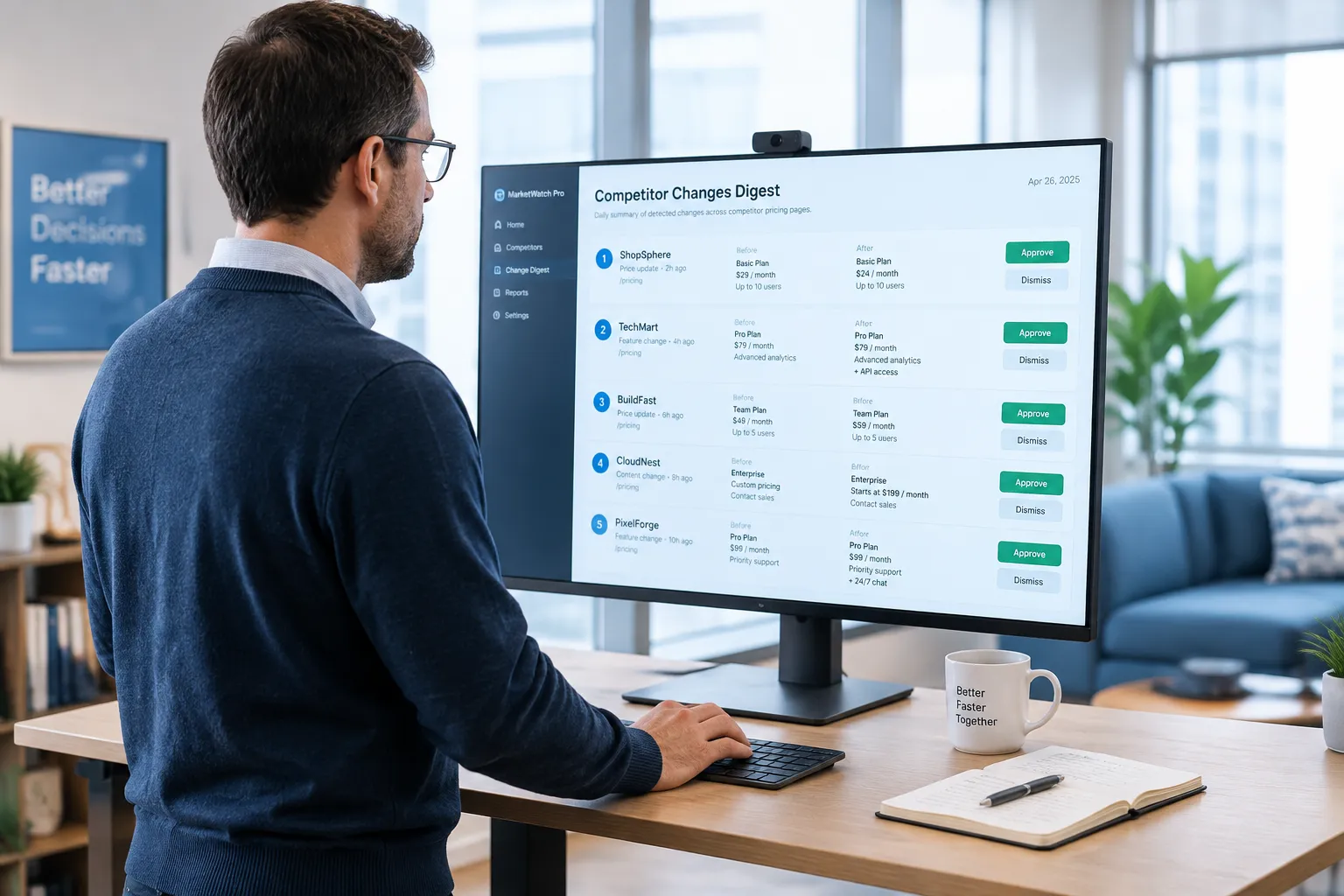
A cheap model labels each change as pricing, feature, hiring, messaging or noise. It then scores it against your rubric with the breakdown visible: which rule fired and why. A bare score of 8 out of 10 gets ignored. A score showing that this was a pricing change on the plan you compete with, and that it dropped 15%, gets read. The score should always show the before and after text and link to the saved snapshot, so no one has to trust the model's paraphrase.
5. Enrich only what scored high
The job-search tool researched each employer on pay, reputation and location. The equivalent here is pulling context only for high-scoring changes, such as related job posts, recent press, or your own win-loss notes for that competitor. Enrichment on every change burns money on things nobody reads.
6. Deliver a digest, not an alert firehose
One message, daily or weekly, ranked by score, each item linking to its evidence. A person marks each item useful, not useful, or act on this. Those marks are the data you use to tune the system.
What Went Wrong Before It Worked?
The expensive failures were not in the AI. They were upstream.
In a go-to-market agent we built for a pre-seed tech company, the pipeline for finding prospects and their contacts was failing most of the time. Only 5% of leads had a contact found, and 86% of runs failed. Fixing that one stage, the input handling and verification rather than the model, took contact-found rates to 86%, cut failing runs to 14%, and brought cost per outreach-ready lead from $1.28 to $0.05. The cost fell mainly because we stopped paying a model to process inputs that were broken.
Competitor monitoring has the same shape. Expect these in your first month:
- Noise false positives. A page that rebuilds its layout daily looks like a change every day. You fix it with better text extraction and per-page ignore rules, not a smarter model.
- Silent fetch failures. A page returns an empty shell, the diff sees everything removed, and the model dutifully reports that a competitor deleted its pricing. Add a sanity check: if the fetched text is under a minimum length, flag it as a fetch error and do not classify it. For more on why runs fail, see our guide to AI agent pipeline failures.
- Confident wrong summaries. Models sometimes describe a change that did not happen, or miss the one that did. This is why every digest item links to the before and after text.
What Does It Cost to Run, and How Do You Know It Is Worth It?
The number that matters is not cost per call. It is cost per useful alert: total run cost divided by the number of digest items a person marked useful.
Total run cost has three parts: model calls, fetching and hosting, and the human minutes spent on the digest. Three design choices keep it small.
Diff first, model second. If you watch 8 competitors across 4 pages each, that is 32 pages a day. On a typical day only a few have changed, and only those reach a model.
Route by task. In an operations hub we built for an e-commerce brand, routine questions go to a cheap model and only the marketing analysis goes to a stronger one, so running costs stay small. Do the same here. A small model does classification. A stronger model is used only for the weekly synthesis of what the competitor's moves add up to.
Show every paid call. In the job-search assistant, every paid model call is visible in the app. Do the same: log model, tokens and cost for each run, and put a daily spend cap on the pipeline. We also build a kill switch that pauses everything with one action, the same as in the go-to-market system. It is the thing that lets a founder sleep while an agent runs unattended.
If you can see cost per useful alert falling over a few weeks while the useful rate holds, it is working. If cost is flat and your team has stopped opening the digest, it is not, and no amount of model tuning will fix that. Our post on AI agent cost per run and building a golden set covers how to test this before you trust it.
If competitor tracking is a process your team still runs by hand, see how Fintel Analytics builds tools like this. We design and ship AI agents and internal tools that take over exactly this kind of work, with cost tracking, approval steps and audit trails built in.
Where Should a Human Still Approve?
Three places, and we would not remove any of them.
Setting the rubric. The system cannot know that a competitor's new Brazilian payout rail matters to you and their new dashboard theme does not. A person writes the rules, and reviews them monthly.
Reading the digest. Ten minutes, with a yes or no on each item. This is the approval step and the feedback loop in one.
Anything outbound. If you extend the agent to draft a battlecard update, a pricing response or a social post, it drafts and a person approves before anything is published or sent. The operations hub we built works this way for blog and social content: the AI pipelines draft, and nothing goes out without a human approving it. The pattern is described in our guide to content creation with approval steps.
What the agent will not do well: judge intent. It can tell you a competitor cut prices 15%. It cannot tell you whether that is a promotion, a desperate move or a response to something it has not seen. That interpretation is still your job, and the agent's job is to make sure you reach it on the day it happens rather than three weeks later.

Should You Build It or Buy a Platform?
Buying is right more often than builders admit. Use these questions to decide.
- Are your sources mostly public web pages, and are generic categories enough? Buy. Off-the-shelf tools do this well. One 2026 roundup lists a per-competitor plan at $19 a month, and enterprise market intelligence products cost far more. Check current pricing yourself, since it moves.
- Do you need changes scored against your own criteria, such as your plans, your target accounts or your margins? Build. A generic score cannot know your rubric.
- Does the output need to join your internal data? For example, flagging a competitor price move only on products where you make a thin margin. This is the strongest argument for a custom tool, because the join is the value.
- Do you need an audit trail of who approved what? If the intelligence feeds pricing or investor decisions, an auditable log is worth building for.
- How many competitors will you track in a year? Per-competitor pricing can become expensive as the list grows. A small custom tool has a more flat cost curve.
If you answered buy to the first question and no to the rest, start with a platform. If two or more answers point to build, a small internal tool usually pays back faster than it sounds, because the hard part is the first working pipeline and every competitor after that is configuration. For the broader argument, see our view on when to build a small internal tool instead of adding another subscription.
Frequently Asked Questions
Q: How do you automate competitor monitoring with AI?
A: Schedule a job that fetches a fixed list of competitor pages, saves each snapshot and compares it with the last one. Send only the pages that changed to a language model to classify and score the change, then deliver a ranked digest that a person approves or dismisses.
Q: How much does AI competitor monitoring cost to run?
A: It depends on how many pages you watch and how many change each day, because only changed pages need a model call. Measure cost per useful alert, meaning total run cost divided by digest items a person marked useful, and log every paid model call so the figure is visible rather than guessed.
Q: Can AI track competitor pricing changes automatically?
A: Yes, for public pricing pages, provided you diff the text first and add checks for failed fetches. Pages behind logins or bot protection are better handled with a one-click manual capture than with fragile workarounds.
Q: Is it better to build or buy a competitor monitoring tool?
A: Buy if your sources are public pages and generic categories are enough. Build if you need changes scored against your own rubric, joined to internal data such as margins, or logged with an audit trail of approvals.
Q: How do you stop an AI monitoring agent producing false alerts?
A: Strip page noise before comparing, flag short or empty fetches as errors instead of changes, and show the before and after text with every alert so a person can verify it in seconds. Track the useful rate in your digest and tighten the rules when it drops.
Conclusion
The challenge is not finding a model that can summarise a competitor's pricing page. It is building the fetching, diffing, scoring and approval layer around it so the output is cheap, checkable and still used in month three. At Fintel Analytics, we have built agents and internal tools for fast-growing companies that watch sources daily, score what they find with a visible breakdown, track the cost of every model call, and hand a person a yes or no rather than a pile of raw alerts. If your team is still spending hours each week on tabs and spreadsheets to find out what your competitors did, that is a fixable problem, and the fix is a small system you own and can switch off at any time.