 Fintel Analytics
Late-Arriving Data in dbt BigQuery: Fix Silent Metric Corruption
Late-arriving data silently corrupts dbt incremental models in BigQuery — producing wrong metrics that nobody catches until a decision has already been made. Here is how to fix it.
Late-Arriving Data in dbt BigQuery Incremental Models: The Silent Metric Corruptor
Late-arriving data in dbt BigQuery incremental models occurs when source events arrive after your pipeline's watermark has already advanced past them — meaning those records are silently excluded from your metrics, forever. The problem is almost invisible in development, catastrophic in production, and almost always underestimated by teams that are new to incremental model design.
If your pipeline uses a max(updated_at) watermark and processes only records newer than the last run, any event that arrives even a few minutes late will be dropped. No error. No alert. Just a slightly wrong number that compounds silently over time until someone — usually a finance lead or a VC doing due diligence — notices your metrics don't add up.
This post explains exactly how this failure mode works, how to detect it in a live BigQuery environment, and the specific patterns we use at Fintel Analytics to build late-data-tolerant incremental pipelines that hold up under real production conditions.
Why Does Late-Arriving Data Break dbt Incremental Models?
To understand the failure, you first need to understand how a standard dbt incremental model filters its source data. The canonical pattern looks something like this:
{% if is_incremental() %}
  WHERE updated_at > (SELECT MAX(updated_at) FROM {{ this }})
{% endif %}
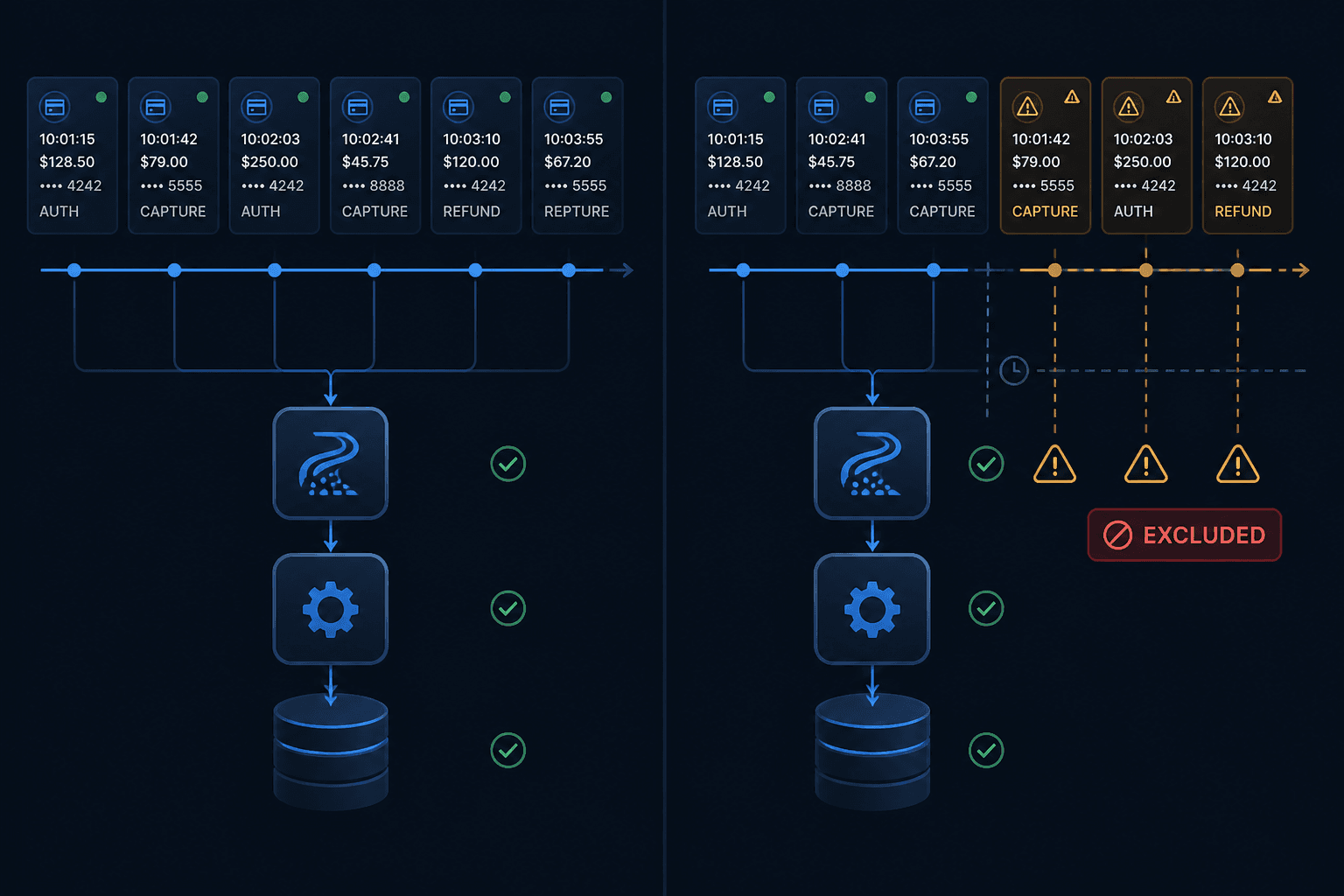
This tells dbt: "on an incremental run, only process records newer than the latest record already in this table." It is efficient. It is cheap. And it is fundamentally broken if your source data can arrive out of order — which it almost always can.
Consider a payments pipeline ingesting webhook events from a third-party processor. The processor fires a payment.settled event at 14:00. Your pipeline runs at 14:05, advances the watermark to 14:05, and successfully processes everything up to that point. But network latency, retry logic, or a queue backlog means that event actually arrives in your raw layer at 14:09. Your watermark is already at 14:05. The record is newer than the source write time BigQuery saw — but it lands after the watermark has moved. It is silently excluded.
Multiply that by thousands of transactions per day across multiple upstream systems and you do not have a data quality problem — you have a business intelligence problem. Revenue figures are understated. Conversion rates are off. Cohort analyses are quietly broken from day one.
The underlying mechanics compound the issue further. BigQuery charges based on bytes scanned, not rows returned. A poorly designed incremental model that re-scans large portions of a partitioned table to compute its own watermark on every run adds both cost and latency without solving the correctness problem. The two failure modes — late data exclusion and unnecessary full scans — frequently appear together in the same pipeline.
📺 Watch: Handling Late Arriving Data (The Watermark Problem) — Essentials of D.E | Video #3
How to Detect Late-Arriving Data in a Live BigQuery Pipeline
The first challenge is that late-arriving data failures produce no errors. Your dbt run completes successfully. Your BI tool shows a number. The number is wrong.
The most reliable detection method is to instrument your source data for event-time versus processing-time skew. Specifically, you want to measure the gap between when an event occurred (the business timestamp — a payment_timestamp, order_created_at, event_fired_at) and when it arrived in BigQuery (_dbt_source_relation load time, or a raw ingestion timestamp if your loader tracks it).
In BigQuery, you can query this directly against your raw layer:
SELECT
  DATE(event_timestamp) AS event_date,
  TIMESTAMP_DIFF(ingestion_timestamp, event_timestamp, MINUTE) AS arrival_lag_minutes,
  COUNT(*) AS record_count
FROM raw.payment_events
WHERE ingestion_timestamp >= TIMESTAMP_SUB(CURRENT_TIMESTAMP(), INTERVAL 7 DAY)
GROUP BY 1, 2
ORDER BY 1 DESC, 2 DESC
If you see meaningful record volumes with an arrival_lag_minutes above your pipeline's run frequency, those records are at risk of being dropped by a naive watermark. In practice, we regularly find late windows of 15–45 minutes in payment webhooks, and occasionally several hours in systems that batch-upload overnight data with event timestamps reflecting the actual transaction time rather than the upload time.
The second detection method is to audit your existing incremental tables for temporal gaps. Query your mart layer for time periods where record counts drop suspiciously below the rolling average — a gap of 2–3% in daily transaction counts is easily mistaken for normal variance when it is actually a systematic exclusion of late arrivals.
A pattern we see repeatedly in early-stage companies: a team builds an incremental model during development against a backfilled dataset where all records have already arrived. Everything looks correct. The model goes to production. Three months later, the finance team notices their dashboard revenue is consistently 1–2% below what the payment processor reports, and the discrepancy is attributed to "timing differences" rather than investigated as a pipeline bug.
The Lookback Window Fix — and Why Most Teams Get It Wrong
The standard fix for late-arriving data in dbt incremental models is to apply a lookback window: instead of filtering on updated_at > max(updated_at), you subtract an offset to give late records a chance to be re-processed.
The naive version looks like this:
{% if is_incremental() %}
  WHERE updated_at > (SELECT MAX(updated_at) FROM {{ this }}) - INTERVAL 3 HOUR
{% endif %}
This is better than nothing, but it has two significant problems that most teams do not account for.
Problem 1: The lookback window is arbitrary and unevidenced. If you chose 3 hours because it felt reasonable, you have not actually measured your source data's arrival lag distribution. Some upstream systems batch late arrivals at T+24 hours. Some payment processors retry failed webhook deliveries for up to 72 hours. A 3-hour window solves the 15-minute problem while leaving the 6-hour problem entirely intact.
The correct approach is to measure your actual lag distribution (using the query structure above) and set your lookback window at the 99th percentile of observed lag — not a round number you guessed at. For most payment and e-commerce pipelines we work on, this is somewhere between 2 and 48 hours depending on the upstream system.
Problem 2: A fixed lookback window still does not handle true late arrivals outside the window. If a record arrives 5 days late — which does happen with certain ERP integrations, manual data uploads, or correction events from financial processors — a 48-hour window will not catch it.
The more robust pattern is a two-tier approach:
- A primary incremental model with a generous lookback window for routine late arrivals (e.g. 24–48 hours for payments data)
- A periodic full-refresh or deep-lookback reconciliation model that runs weekly and reprocesses the last 30 days of data to catch any stragglers
This gives you the cost efficiency of incremental runs for the 99% case while maintaining correctness for the 1% case.
It is also worth noting the BigQuery cost implications here. Extending a lookback window from 1 hour to 48 hours increases the data scanned on every incremental run proportionally — unless your table is properly partitioned and your incremental filter uses a partition column directly. If your updated_at filter does not align with your partition key, you are scanning the full table on every run regardless of the window size. We covered this failure mode in detail in our post on dbt models querying partitioned BigQuery tables without partition filters — it is worth reading alongside this one.

Building a Late-Data-Tolerant Incremental Model: The Production Pattern
If you are looking to implement this correctly — or to audit whether your existing implementation is holding up — explore how Fintel Analytics approaches data pipeline design — we build and audit exactly this kind of incremental architecture for growth-stage companies running on BigQuery and dbt.
Here is the production pattern we use when building incremental models that need to handle late-arriving data correctly:
Step 1: Define your watermark on ingestion time, not event time
Where possible, use the timestamp at which a record arrived in your raw layer as your incremental filter, not the business event timestamp. Ingestion time is monotonically increasing and controlled by your pipeline. Event time is set by the upstream system and can be anything.
If your loader (Fivetran, Airbyte, or a custom pipeline) adds a _fivetran_synced or _loaded_at column, use that as your watermark column. Then separately handle event-time ordering at the mart layer, where you can apply the business logic around which timestamp actually matters for your metrics.
Step 2: Add an explicit lookback variable with a measured default
{%- set lookback_hours = var('lookback_hours', 48) -%}

{% if is_incremental() %}
  WHERE _loaded_at >= TIMESTAMP_SUB(
    (SELECT MAX(_loaded_at) FROM {{ this }}),
    INTERVAL {{ lookback_hours }} HOUR
  )
{% endif %}
Making the lookback window a variable means you can override it at run time for catch-up runs without changing the model code. It also signals to the next engineer maintaining the model that this value was a deliberate choice, not a magic number.
Step 3: Deduplicate after the lookback reprocess
A lookback window will re-process records that were already correctly loaded in a previous run. Without deduplication, you will produce duplicate rows in your output. Use a QUALIFY ROW_NUMBER() OVER (PARTITION BY primary_key ORDER BY updated_at DESC) = 1 pattern inside your incremental model to ensure idempotency.
Step 4: Build a reconciliation model that runs weekly
Create a separate dbt model — typically materialised as a table, running on a weekly schedule — that reprocesses the last 30 days from source and compares row counts and key metric totals against your mart layer. Any discrepancy above a defined threshold triggers a dbt test failure or an alert to your data team. This is your insurance policy against the tail of your lag distribution.
In our work with a global payments company, implementing this pattern caught a systematic late-arrival issue from a third-party settlement provider that was delivering correction events 72 hours after the original transaction. The incremental model with a 24-hour lookback was dropping them entirely. The weekly reconciliation job surfaced a growing discrepancy — and after investigation, the gap was traced to a specific corridor where settlement timing was consistently delayed. The fix took a day to implement; the undetected version was producing revenue figures that were understated by a consistent margin across that corridor.
What About dbt Freshness Tests — Do They Help?
A common misconception is that configuring dbt source freshness will catch late-arriving data problems. It will not. Source freshness tests check whether any new data has arrived in your source table within a defined window — not whether all data that should have arrived by now has actually arrived.
A source freshness check that passes tells you: "records are being loaded into this table." It does not tell you: "all records that occurred in the last 24 hours are present in this table."
For catching late-arrival gaps, you need business-logic tests — tests that validate metric continuity rather than just data presence. Examples include:
- Daily transaction count should be within ±5% of the 14-day rolling average
- No 4-hour window within business hours should have zero transaction records
- Settled amounts reconciled against PSP report should match within £500 per day
These tests belong in your dbt project as singular tests or custom macros, scheduled to run after each pipeline execution. They catch the failure mode that freshness checks entirely miss.
For further detail on how dbt source freshness gaps can create false confidence in your pipeline, see our post on dbt staging layer materialisation in BigQuery — the materialisation decisions you make in your staging layer directly affect how exposed you are to this kind of late-data risk.
Frequently Asked Questions
Q: What is late-arriving data in a dbt BigQuery pipeline?
A: Late-arriving data refers to source records that reach your raw data layer after your dbt incremental model's watermark has already advanced past them. Because standard incremental models filter on a maximum timestamp, these records are silently excluded from processing — producing incomplete metrics without any error or alert.
Q: How do I fix late-arriving data in a dbt incremental model?
A: The primary fix is to apply a measured lookback window to your incremental filter, reprocessing a defined time period on every run to capture late arrivals. The window size should be based on the observed 99th percentile of your source system's arrival lag — not an arbitrary number. Pair this with a deduplication step and a weekly reconciliation model to catch edge cases outside the main window.
Q: Does a longer lookback window increase BigQuery costs?
A: Yes, unless your incremental filter column is also your BigQuery partition key. If those two things are aligned, BigQuery can apply partition pruning and limit the scan to only the relevant partitions. If they are misaligned, a wider lookback window scans more data and increases cost proportionally. Always validate that your partition pruning is actually engaged using the BigQuery query plan before widening your window.
Q: Will dbt source freshness tests detect late-arriving data?
A: No. Source freshness tests only verify that new data has arrived in a source table within a time threshold — they do not validate completeness. To detect late-arrival gaps, you need business-logic continuity tests that compare metric volumes and totals against expected baselines or external reference data such as a PSP report or payment processor reconciliation file.
Q: How common is late-arriving data in fintech and payments pipelines?
A: Very common. Payment processors, banking APIs, and ERP integrations all produce out-of-order events due to retry logic, settlement batch timing, and network delays. In our experience delivering analytics pipelines for payments and fintech companies, late-arrival windows of 15 minutes to 72 hours are routine depending on the provider — and almost none of the teams we audit have built their incremental models to account for it.
Late-arriving data is one of the most expensive data quality problems to discover late, precisely because it produces no errors and no warnings — just quietly wrong numbers that compound over time. At Fintel Analytics, we have audited and rebuilt incremental pipelines for payments companies, fintech lenders, and e-commerce platforms where this exact failure mode was the root cause of persistent metric discrepancies that had been written off as "rounding differences" for months. If your incremental models are running on a naive watermark and your team has never stress-tested them against out-of-order source data, the risk is almost certainly already present in your production environment — and it is a fixable problem.