 Fintel Analytics
BigQuery Column-Level Encryption in dbt: Protect Sensitive Data
BigQuery column-level encryption lets you protect PII and financial data at the field level — but wiring it correctly into dbt without breaking downstream models is harder than the docs suggest.
BigQuery column-level encryption in dbt lets you encrypt individual sensitive fields — account numbers, card PANs, email addresses — so that even users with full table access cannot read plaintext values without the correct Cloud KMS key. Done correctly, it eliminates an entire class of data exposure risk. Done carelessly, it silently breaks joins, aggregations, and downstream models that nobody notices until an analyst asks why the numbers look wrong.
This is a topic that comes up constantly in fintech and payments engagements. The compliance requirement is clear: sensitive fields must be protected at rest and in transit, beyond what BigQuery's default encryption already provides. The implementation question — how do you actually wire this into a dbt project without creating a maintenance disaster — is where most teams get stuck.
This guide covers exactly that: what BigQuery column-level encryption is, how it interacts with dbt's materialisation and transformation layer, what the real implementation pitfalls look like in practice, and how to make a decision about deterministic versus non-deterministic encryption before you write a single line of SQL.
What Is BigQuery Column-Level Encryption and Why Does It Matter for dbt Teams?
BigQuery supports column-level encryption with Cloud KMS using AEAD encryption SQL functions, providing a second layer of protection at the column level. This is distinct from BigQuery's default encryption at rest, which protects the storage layer but leaves data readable to anyone with table-level IAM access. Column-level encryption goes further: the ciphertext is stored in the column itself, and decryption requires both table access and a valid Cloud KMS key — a "double access control" model where a user must be granted permission to both the table and the encryption key to read data in cleartext.
For dbt teams, this matters because dbt models are SQL transformations that run on top of BigQuery tables. If a sensitive field is encrypted in a source table and your staging model selects it without calling AEAD.DECRYPT_STRING(), you get ciphertext flowing into your marts. If you decrypt it in staging and materialise the result as a table, you've just landed plaintext PII in a new location — potentially with broader IAM access than your source. The transformation layer creates new exposure vectors if you don't plan the encryption boundary deliberately.
These features are particularly useful for companies that store personally identifiable information (PII) and other sensitive data such as credit-card data and biometric information. In our work with fintech and payments clients, the fields in scope are almost always the same set: cardholder names, IBANs, email addresses, phone numbers, date of birth, and — for lending companies — income and credit score data. The regulatory pressure to protect these fields at the column level, rather than relying solely on IAM, has increased sharply as regulators have scrutinised data access controls more closely.
The business stakes are real. A 2025 report by the IBM Institute for Business Value found that over a quarter of organisations estimate they lose more than USD 5 million annually due to poor data quality, with 7% reporting losses of USD 25 million or more. Column-level exposure incidents sit at the high-severity end of that distribution — the ones that reach regulators, not just engineering retrospectives.

📺 Watch: Understanding BigQuery data governance
Deterministic vs Non-Deterministic Encryption: The Decision That Changes Everything Downstream
BigQuery supports deterministic and non-deterministic encryption functions. With deterministic encryption, if both the pieces of stored data and the additional authenticated data are identical, then the ciphertext is identical. That single property is what determines whether your downstream dbt models can still join, group, and aggregate on encrypted columns — or whether they break entirely.
Here is the practical split:
Non-deterministic (AEAD_AES_GCM_256): Each encryption call produces a different ciphertext even for the same plaintext. Maximum security, but you cannot join two tables on an encrypted field, cannot GROUP BY it, and cannot deduplicate on it. Use this for fields that are never used as join keys or filter conditions — free-text fields, narrative data, fields that are only ever decrypted for display.
Deterministic (AEAD_AES_SIV_CMAC_256): The same plaintext always produces the same ciphertext (given the same key and additional authenticated data). This supports grouping, aggregation, and joins on encrypted data. Use this for fields like email address, user ID surrogate, or IBAN where you need to join across tables without decrypting first.
The mistake we see repeatedly — particularly in teams that inherit an encryption design from a security consultant who has never written a dbt model — is applying non-deterministic encryption to a field like customer_email that is also used as the join key between the orders model and the users model. The join returns zero rows. The mart silently produces metrics for a population of one, or null. Nobody catches it until an analyst notices the cohort sizes are wrong, three sprints later.
Before you touch a line of SQL, map every candidate column against two questions: (1) Is this field ever used in a JOIN, GROUP BY, or deduplication? (2) Does the downstream model need to decrypt it, or just pass the ciphertext through? The answers dictate encryption mode and where in the dbt DAG the decrypt call should live.
How to Implement Column-Level Encryption Inside dbt Models
BigQuery's AEAD functions are native SQL — they work inside dbt models like any other SQL expression. The implementation pattern has four layers:
Layer 1: Key management via Cloud KMS. You use Cloud Key Management Service (Cloud KMS) to encrypt the keys that in turn encrypt the values within BigQuery tables. Cloud KMS encrypts your data encryption key (DEK) with a second key encryption key (KEK). In BigQuery, referencing an encrypted keyset instead of a plaintext keyset helps reduce the risk of key exposure. The KMS resource name is passed into your queries as a parameter — never hardcoded in a dbt model file that lives in version control.
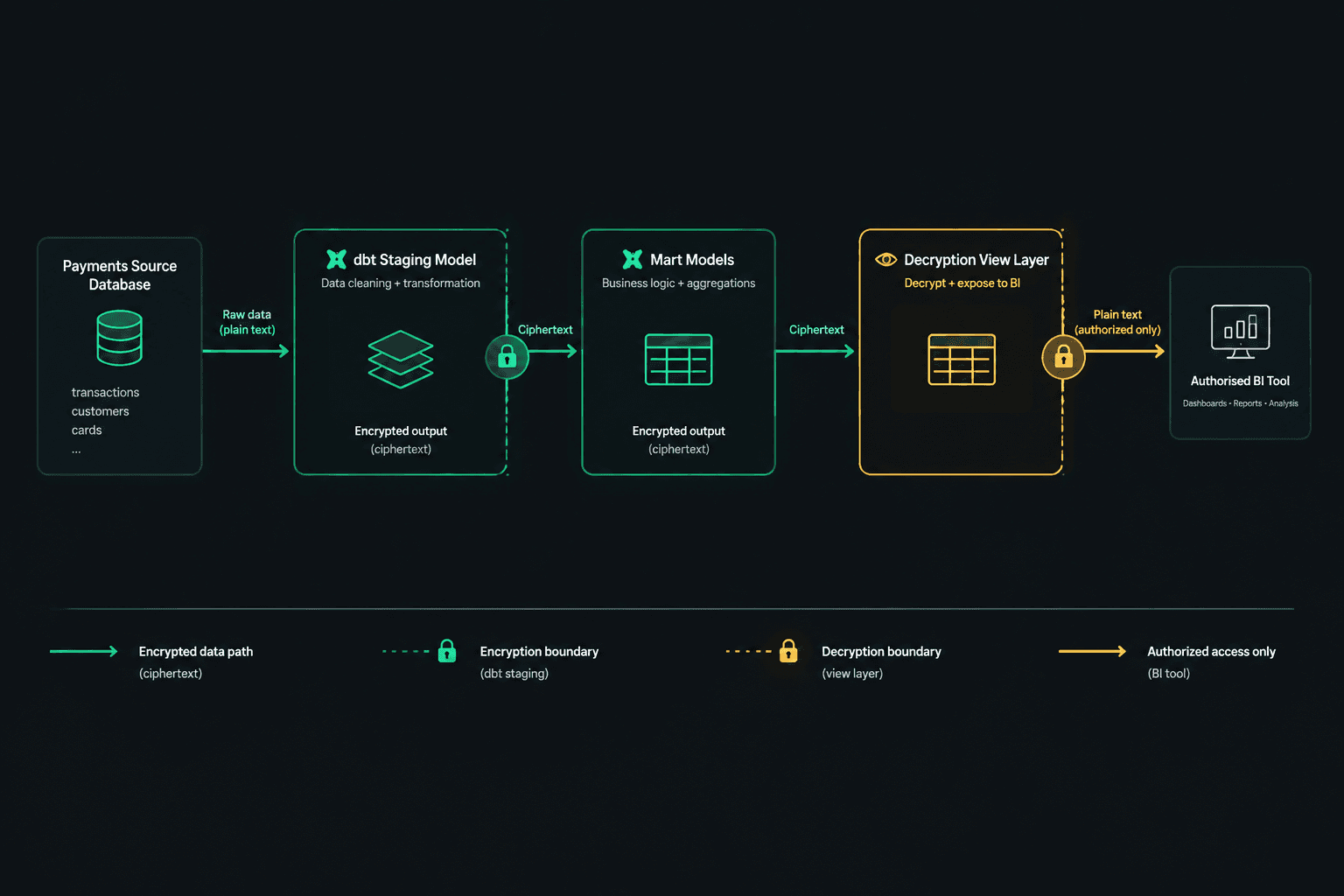
Layer 2: The encryption boundary in staging. The staging layer is where source data enters your dbt project. This is the correct place to encrypt fields arriving in plaintext from operational systems. A staging model for a payments source might look like this (using plain SQL notation):
SELECT
  transaction_id,
  AEAD.ENCRYPT(
    KEYS.KEYSET_CHAIN(
      '{{ var("kms_resource_name") }}',
      {{ var("wrapped_keyset") }}
    ),
    cardholder_name,
    CAST(transaction_id AS STRING)
  ) AS cardholder_name_enc,
  amount,
  created_at
FROM {{ source('payments', 'transactions') }}
Note that cardholder_name never appears in plaintext in any materialised model downstream of this staging layer. The transaction_id is used as the associated authenticated data — this ties the ciphertext cryptographically to the specific row and prevents ciphertext from being transplanted to a different row.
Layer 3: Decrypt only at the access boundary. Downstream marts and BI-facing models should pass the encrypted column through as ciphertext. Decryption should happen only in a view or macro that is accessed by authorised roles — not materialised as a table. BigQuery's column-level encryption is more about who can decrypt than how it's encrypted. If you materialise decrypted values into a dbt table model, you have moved the plaintext data and need to audit the IAM on the destination dataset with the same rigour as the source.
Layer 4: dbt variables and secrets. KMS resource names and wrapped keysets must be passed as dbt variables at runtime — sourced from a secrets manager (GCP Secret Manager, or AWS Secrets Manager if you are running a hybrid stack) and injected into the dbt run command by your orchestration layer. They must never appear in dbt_project.yml, profiles.yml, or any file committed to version control. This is the most commonly violated rule in implementations we review.
If you are evaluating how to structure this across a multi-project dbt setup, the considerations around cross-project access to encrypted datasets are significant — see our post on dbt Multi-Project Architecture in BigQuery for the access boundary decisions that apply here too.
If you would like to explore how Fintel Analytics approaches encryption design within dbt projects, explore our services — we work with fintech and payments companies globally to design and deliver compliant, production-ready data stacks.
What Breaks When You Encrypt Columns in dbt — And How to Fix It
Column-level encryption introduces failure modes that are invisible in unit tests and only surface in integration or production. These are the ones we encounter most often:
Broken joins on non-deterministic ciphertext. Covered above — the fix is switching to deterministic encryption for join-key columns. If you cannot change the encryption mode (because the source system controls it), you need a decryption layer before the join and must carefully control what gets materialised.
Cache misses caused by non-deterministic output. BigQuery doesn't store your encryption key — you provide it at query time, and encryption and decryption happen in the BigQuery engine when it processes your query. Non-deterministic encryption means every run of the model produces different ciphertext for the same plaintext — this invalidates BigQuery's query cache entirely. For models that run on a schedule and are expensive to compute, this is a cost issue as well as a performance one. If query cache hit rate matters to your bill, deterministic encryption is the only option. For more on cache invalidation patterns in dbt, see our post on Non-Deterministic Functions in dbt BigQuery: Why Your Cache Never Hits.
Incremental model logic failing on encrypted columns. dbt incremental models use a unique_key or merge predicate to identify rows to update. If your unique_key is an encrypted column, deterministic encryption is mandatory — otherwise the merge predicate never matches existing rows and your incremental model behaves as a full refresh on every run. We have seen this produce tables with millions of duplicate rows before anyone noticed.
dbt tests failing on encrypted values. Standard dbt not_null and accepted_values tests work fine on ciphertext — the column is not null, and the ciphertext is a valid BYTES value. But unique tests on non-deterministic ciphertext will always pass even if the underlying plaintext contains duplicates, because every ciphertext value is unique by construction. You need custom data tests that decrypt before asserting uniqueness, and those tests require the KMS key at test runtime — which means your CI/CD pipeline needs access to the secret. This is a significant architectural decision for teams using ephemeral CI environments.
Authorised view access to encrypted columns. If you are using authorised views in BigQuery to grant downstream consumers access to decrypted data, the service account behind the view must have KMS decrypt permissions — not just table access. This is a common misconfiguration. The view runs as the view creator's identity for data access but as the caller's identity for KMS calls, depending on how you've structured the IAM. Test this explicitly in a non-production environment before promoting to production.
What Does a Production-Ready Encryption Architecture Look Like?
From delivery experience across several fintech and payments clients, a production-ready column-level encryption setup in a dbt/BigQuery project has these characteristics:
One encryption boundary, clearly documented. Sensitive fields are encrypted exactly once — in the staging model closest to the source. There is no second encryption step downstream and no ad-hoc encryption in mart or reporting models. The dbt project README explicitly states which fields are encrypted, in which staging models, and which KMS key ring manages them.
Decryption only in views, never in materialised tables. Decryption happens in BigQuery views that have restricted IAM. Mart models pass ciphertext through. BI tools (Holistics, Looker, or similar) connect through these views and rely on the IAM layer to control who sees plaintext. This means your BI connection service account must have KMS decrypt access — and you document that dependency explicitly.
Key rotation handled outside dbt. Cloud KMS key rotation does not automatically re-encrypt stored ciphertext in BigQuery. When a key version is rotated, you need a data migration job that decrypts with the old key version and re-encrypts with the new one. This job must run before the old key version is destroyed. We have seen teams destroy key versions and lose access to years of encrypted data — treat key lifecycle management as a first-class operational process, not an afterthought.
Runtime secrets, never static variables. KMS resource names and wrapped keysets are injected at dbt run time from a secrets manager. The CI/CD pipeline has its own service account with KMS decrypt permissions scoped to the test dataset only — never production keys in CI.
Monitoring on decryption failures. AEAD.DECRYPT_STRING() raises an error if the key is wrong or the ciphertext is corrupted. In a production pipeline, this surfaces as a dbt model failure. Set up alerting on model failures for any model that calls a decrypt function — these failures can indicate key misconfiguration, key rotation issues, or data corruption, all of which need immediate triage.
A pattern worth noting from one fintech engagement: a capital reconciliation project we delivered uncovered a $25M discrepancy that had gone undetected — at market borrowing rates, that gap was costing over $6,000 per day. The root cause included unvalidated plaintext data flowing through models where encrypted and unencrypted values were being compared in a join that silently failed to match rows. Column-level encryption, done correctly, would have made the mismatch visible at the staging layer rather than three months into production.
Frequently Asked Questions
Q: Does BigQuery column-level encryption replace the need for column-level security (policy tags)?
A: No — they serve different purposes and should be used together. Column-level security with policy tags controls who can query a column. Column-level encryption with AEAD controls who can decrypt the values even if they can query the column. A user with table access and no KMS permission can still see the encrypted bytes — they just cannot read the plaintext. For sensitive fields, implementing both layers gives you defence in depth.
Q: Can I use BigQuery column-level encryption with dbt incremental models?
A: Yes, but only with deterministic encryption on any field used as the unique_key or merge predicate. Non-deterministic encryption on join or merge keys will cause every run to behave as a full refresh, duplicating rows. Test your incremental logic explicitly in a dev environment before promoting encrypted models to production.
Q: Where should I call AEAD.DECRYPT_STRING() in my dbt project — in staging, marts, or views?
A: Decrypt in views, not in materialised models. Decrypting in a staging or mart model and materialising the result as a BigQuery table creates a new plaintext copy of the data with its own IAM surface. The correct pattern is to pass ciphertext through your materialised dbt models and expose a decryption view — with tightly scoped IAM — for authorised consumers and BI tools.
Q: Will BigQuery column-level encryption break my dbt tests?
A: Standard schema tests (not_null, unique) work on ciphertext but may give misleading results — unique always passes on non-deterministic ciphertext. You need custom singular tests that decrypt before asserting, which requires KMS access in your test environment. Plan your CI/CD service account permissions and secret injection strategy before building test coverage for encrypted models.
Q: How do I handle key rotation without losing access to historical encrypted data?
A: Cloud KMS supports key version rotation, but it does not automatically re-encrypt existing ciphertext in BigQuery. You must run a migration job that decrypts with the old key version and re-encrypts with the new one before destroying the old version. Treat key lifecycle as an operational process with runbooks, not a Cloud KMS setting you can set and forget.
At Fintel Analytics, we have designed and delivered column-level encryption architectures for fintech and payments clients operating under GDPR, PCI-DSS, and FCA data handling requirements — from initial encryption boundary design through to production dbt implementation and BI access layer configuration. If your team is storing sensitive financial or personal data in BigQuery and relying solely on IAM for field-level protection, that is a gap that regulators and acquirers are increasingly examining — and it is a fixable problem with a clear, repeatable implementation path.