 Fintel Analytics
Automate Invoice Processing With AI: Without Losing Control
Extracting data from a PDF is the easy part. Here is how to automate invoice processing with AI so finance can trust the output, audit it and afford it.
To automate invoice processing with AI safely, you need four things around the model: extraction into a fixed schema, validation rules written in code rather than in a prompt, a human approval step for anything risky or low-confidence, and a cost and audit log for every invoice. The model that reads the PDF is the easy part. The controls around it decide whether finance trusts the output.
Most founders and heads of finance we speak to are not short of invoices. They are short of hours. Invoices arrive in a shared inbox, get keyed into a spreadsheet, get checked against a bank app, and then someone tries to work out in month-end what a supplier relationship actually cost. A pattern we see repeatedly is a skilled finance or operations person spending several hours a week on typing, chasing and cross-checking when their real job is judgement. This post explains how to remove that work without creating a new problem: an AI that quietly posts wrong numbers into your books.
Why Do Most Attempts to Automate Invoice Processing With AI Stall?
They stall because the pilot proves extraction works and then nobody can answer three questions: what does one run cost, what happens when the model is wrong, and who approves the output. We see this in nearly every AI pilot that never reaches production. The demo reads twenty sample PDFs perfectly. Production brings scanned receipts, multi-currency credit notes, a supplier who changes their bank details, and a PDF with two invoices stapled together.
The benchmark gap is real, which is why the effort is worth it. Ardent Partners' 2025 data, as reported by LandingAI, puts the typical cost of processing one invoice at $12.88, against $2.78 for the best performers. Figures differ between reports and between definitions of cost, so treat any single number as directional. The same data points to cycle time as a bigger tell: invoices take 17.4 days for manual-heavy teams versus 3.1 days for best-in-class teams.
Two other statistics explain why so many projects disappoint. Only 22% of organisations have reached touchless invoice rates above 75%, according to Ardent Partners' State of ePayables 2025. And ERP integration gaps limit end-to-end automation in 47% of organisations surveyed in 2025. In other words, even well-funded teams struggle to get invoices from capture all the way to a trusted ledger entry.
Our reading of this, from delivery work, is that the best performers do not have a better model. They have a better workflow. The same finding appears in the LandingAI write-up of the data: the difference is a better workflow, not better software.
For a growth-stage company the pain looks different from a large enterprise. You probably have a few hundred invoices a month, not hundreds of thousands. You have no AP department, just a founder, a finance lead and a bookkeeper. Your invoices live in an inbox, a spreadsheet, and sometimes a bank app, and nobody can say what a single order or customer contract actually earned after costs. That is a data problem as much as an automation problem, and it is why invoice automation should be designed as a data pipeline first.
📺 Watch: VectorShift Tutorial: Automate Invoice Processing with AI
What Does a Production Invoice Pipeline Actually Look Like?
A production pipeline has six stages, and the model is only involved in two of them. Here is the shape we build to.
- Capture. One forwarding address or upload point. The original file is stored untouched and never overwritten, so any later question can be answered from the source document.
- Extract. The model reads the document and returns a fixed structure: supplier, invoice number, issue date, due date, currency, line items, tax and total, and payment details. If a field is missing, the output says so rather than guessing.
- Validate. Plain code checks the extraction. No model is involved.
- Match. The invoice is matched against what you expected: a purchase order, a supplier prepayment balance, a contract, or a recurring cost.
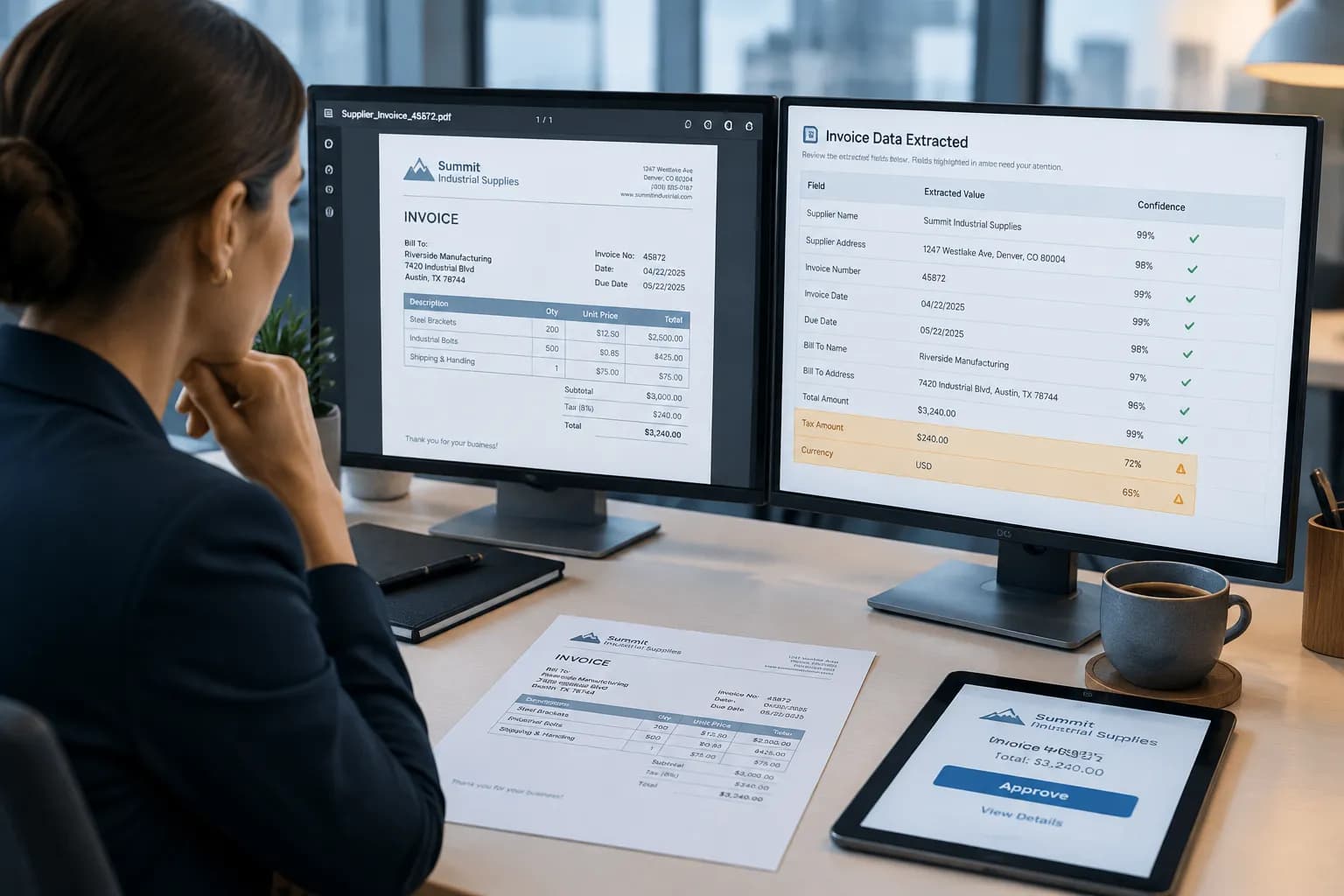
- Approve. A person sees the original document beside the extracted fields and answers yes or no. Only flagged invoices need real attention.
- Post and log. The approved record lands in your warehouse, your accounting system or your spreadsheet, and the decision is written to an append-only log with who, when and which version of the pipeline.
The order matters. Teams that start with a model and bolt controls on afterwards end up with an extraction tool and a spreadsheet full of corrections. Teams that start with the approved record and work backwards end up with a system finance will actually sign off.
The last step is where most of the long-term value sits. If extracted invoices land as structured rows in BigQuery, modelled in dbt and exposed through a SQL semantic layer, then supplier spend means the same thing in the finance dashboard as it does in the operations dashboard. That is the single source of truth problem we see in a lot of growing companies, solved as a by-product of automating the boring work.
Where Should Validation Live: In the Prompt or in Code?
In code, every time. The most common mistake we see is a prompt that says something like check that the totals add up. A language model can be fluent and wrong at arithmetic, and it will not tell you when it was. Arithmetic, format and consistency checks are deterministic, so they belong in deterministic code.
The validation layer we build for invoice work typically includes:
- Arithmetic checks. Line items sum to the subtotal, and subtotal plus tax equals the total, within a defined rounding tolerance.
- Format checks. Currency is a valid ISO code, dates parse and are not in the future, and tax identifiers match the expected pattern for the country.
- Duplicate detection. The same supplier and invoice number, or the same supplier, amount and date, is a hard stop. Duplicates are one of the most common ways money leaves a business unnoticed.
- Change detection. If a supplier's bank details differ from the last approved invoice, the invoice is blocked and routed to a person. This single rule is your best defence against payment redirection fraud.
- Plausibility checks. An amount ten times the supplier's historical average gets flagged, not paid.
This mirrors a lesson from a go-to-market system we built for a pre-seed tech company. The agent drafts outreach, but the style rules are enforced in code rather than requested politely in a prompt. Separately, fixing the weakest stage of its prospecting pipeline took the share of leads with a contact found from 5% to 86% and cut failing runs from 86% to 14%. The model did not change much. The surrounding workflow did. Invoice automation behaves the same way: when accuracy is poor, look at validation and matching before you blame the model.
Deterministic checks are also fast. In one engagement, a reconciliation process that took 30 to 50 minutes was rebuilt as an automated SQL pipeline and now completes in under 3 seconds. In another, a capital reconciliation project surfaced a $25M discrepancy that had gone undetected, which at market borrowing rates was costing over $6,000 a day. Those numbers are not about invoices, but the lesson transfers: unvalidated financial data hides expensive problems, and rule-based checks find them cheaply.
If you are looking to implement this in your organisation, explore how Fintel Analytics approaches this. We work with businesses globally to design and deliver production-grade automation, not demos.
How Much Does It Cost to Automate Invoice Processing With AI?
The honest answer is that it depends on your mix of documents, but you should be able to calculate it per invoice before you start. Some vendor benchmarks claim costs under $1 per invoice with full AI-powered automation, versus $10 to $22 manually. Treat those as vendor-reported marketing ranges and measure your own.
The cost of one processed invoice has four components:
- Model and extraction calls. Often small, but they multiply fast when a pipeline retries a failing document five times.
- Infrastructure. Storage, queues and the warehouse tables the results land in.
- Human review time. Usually the largest component, and the one most automation business cases forget.
- Exception handling. The time spent on the invoices the system could not process.
Three controls keep the first component small. First, route by difficulty. A clean digital PDF from a supplier you have seen fifty times does not need your strongest model. A blurry scan with handwritten notes might. We covered the routing logic in our guide to LLM model routing strategy, and it is the same approach we used in an operations hub for an e-commerce brand, where routine questions go to a cheap model and only the analysis that needs it goes to a stronger one. Running costs stay small as a result.
Second, cap retries and log every call. Every model call in our systems is costed and visible, and the go-to-market system has a kill switch that pauses the whole pipeline if spend or error rates drift. Third, measure the right unit. The number that matters is the cost per approved invoice, not the cost per model call. For a full method, see our breakdown of AI agent cost per run.
Track three metrics from week one: touchless rate (invoices approved with no edits), exception rate (invoices flagged by validation), and cost per approved invoice. If touchless rate is climbing and cost per approved invoice is falling, you are on the right path. If exception rate is flat, your validation rules or supplier master data need work, not your model.
What Should the Human Approval Step Look Like?
It should take seconds, not minutes, and it should leave a record. The approver sees the original document on one side and the extracted fields on the other, with any field that failed a check highlighted. They answer yes or no. If no, the reason is captured so the system can learn which suppliers or formats cause trouble.
A good approval design has a few non-negotiable properties:
- Thresholds. Low-value invoices from known suppliers with clean validation can be approved in batches. Anything above a value threshold, from a new supplier, or with a changed bank detail needs individual sign-off.
- Separation of duties. The person who approves is not the person who can change the validation rules.
- A complete trail. Who approved, when, against which version of the rules, and what the model returned. This is what an auditor, an investor doing due diligence or a bank will ask for.
- A way to stop it. If the pipeline starts misbehaving, one switch pauses posting.
We go deeper on this in our post on the AI agent approval workflow and audit trails. The principle is the same one we apply to every agent we build: the AI does the repetitive work and hands a person a yes or no, and that person is accountable for the outcome.
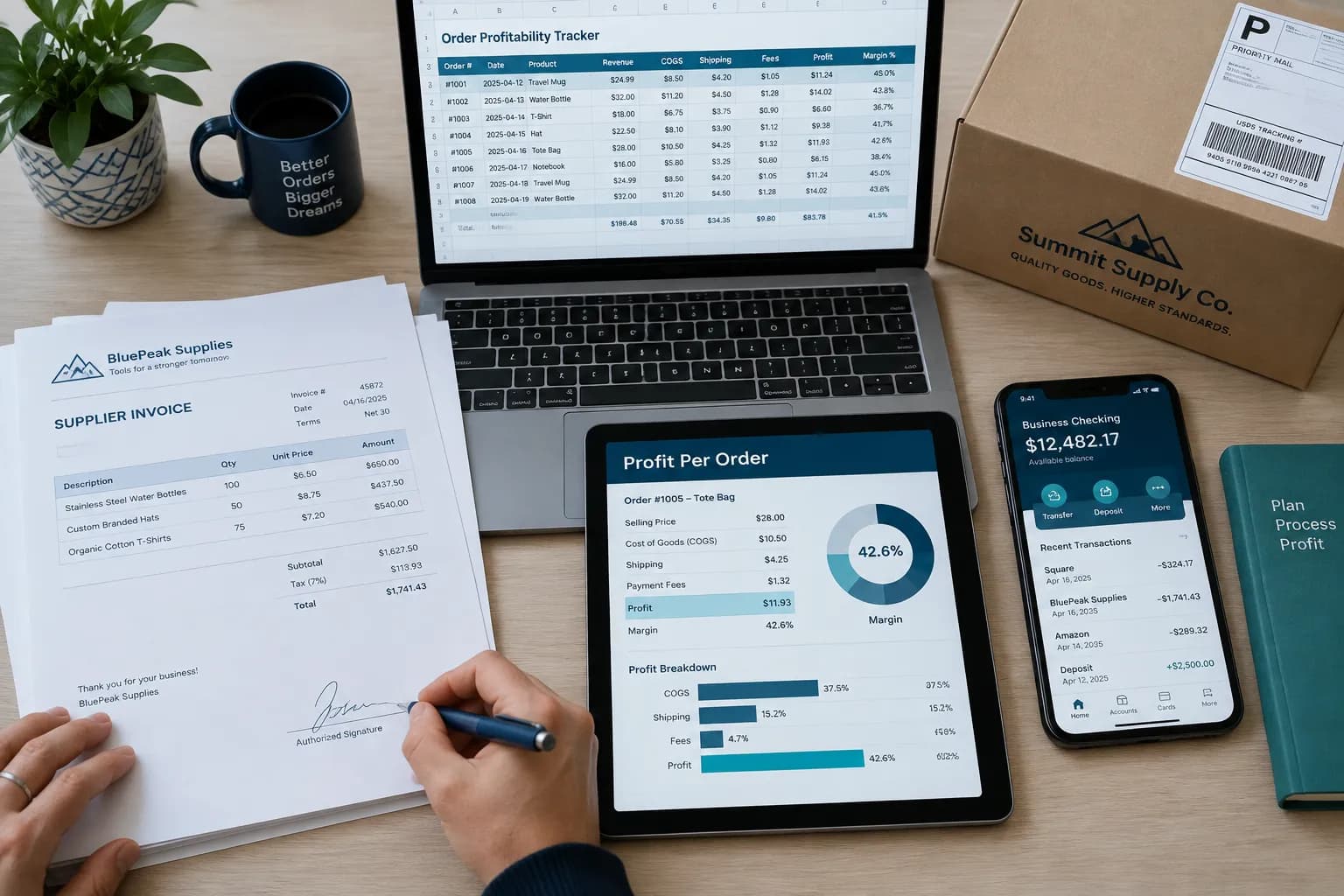
This is also where the business value shows up beyond the AP team. In the operations hub we built for an e-commerce brand, supplier costs flow into net profit and margin per order, alongside a supplier prepayment balance and an expense log kept in sync with the team's spreadsheet. Once invoices are structured and approved, the question nobody could answer before, what did this order actually make after costs, becomes a query rather than a weekend project.
Should You Build, Buy or Combine for Invoice Automation?
There is no universal answer, but there is a practical framework. Ask four questions.
- Are your invoices standard and your volume high? If most invoices come from a handful of suppliers in standard formats and you run a mainstream accounting platform, a bought tool will likely do the extraction well enough. Do not build what is commoditised.
- Do the invoices feed logic that is specific to you? Supplier prepayments, multi-currency costs, landed-cost allocation, cost of goods per order, or revenue shares with partners. Off-the-shelf tools stop at posting a bill. Custom pipelines carry on into margin and cash.
- How many systems does one invoice touch? If an invoice touches a storefront, a spreadsheet, a supplier inbox and a bank app, the integration work is the project. That is where a bespoke pipeline earns its keep.
- Who needs to trust the numbers? If investors, lenders or auditors will review your books, you need the audit trail and the validation rules to be yours to inspect and explain.
For many growth-stage companies the best answer is a hybrid: a bought capture-and-extract layer, with validation, matching, approval and warehouse modelling built around it so the data ends up in a place you control. The trap to avoid is automating the spreadsheet itself. If critical finance logic still lives in a Google Sheet that one person can accidentally edit, automating the inputs only speeds up the arrival of bad data. Move the logic into SQL models in a semantic layer first, or at least at the same time.
Frequently Asked Questions
Q: How do you automate invoice processing with AI?
A: Capture invoices in one place, use a model to extract fields into a fixed schema, then validate them with code-based rules for arithmetic, duplicates and changed bank details. Match them against expected costs, route flagged items to a human for a yes or no, and log every decision to an audit trail. The model is one component, not the whole system.
Q: Is AI accurate enough for invoice data extraction?
A: It is accurate enough for clean, digital invoices and weaker on poor scans, unusual layouts and handwriting. That is why accuracy should be enforced by validation rules and human approval rather than assumed. Measure your own touchless rate and exception rate on real invoices before committing.
Q: How much does it cost to process an invoice with AI?
A: Industry reports vary. One 2025 Ardent Partners benchmark, as reported by third parties, puts typical cost at around $12.88 per invoice against $2.78 for the best performers, and some vendor materials claim under $1 for full automation. Your real figure depends on model calls, infrastructure and, above all, human review time, so track cost per approved invoice.
Q: Can AI invoice processing be audited?
A: Yes, if it is designed for it. Store the original document, the model output, the validation results, the approver and the rule version for every invoice in an append-only log. Without that, an AI pipeline is hard to defend to auditors or investors.
Q: Should a startup build or buy invoice automation?
A: Buy the commodity layer if your invoices are standard and your accounting tool already handles them. Build or extend when invoices feed custom logic such as supplier prepayments, per-order margin or multi-currency costs, or when one invoice touches several disconnected systems.
The real challenge is rarely reading a PDF. It is getting invoices from an inbox into numbers your finance team, your investors and your auditors will trust, at a cost per run you can state and with a human clearly accountable for approval. At Fintel Analytics, we have built production AI agents, operations hubs and BigQuery and dbt data foundations for fast-growing fintech, payments and e-commerce companies, each with cost tracking, approval steps and audit trails from day one. If hours of your best people's week are still going into rekeying and chasing documents, that is a fixable problem, and the fix pays for itself the first time a duplicate payment or a changed bank detail is caught before the money leaves.